Rekkefly
Rekkefly is the new Kinefly. It tracks the wings of a tethered insect (a fly, bee or moth) from a camera or a video file. It streams each wing's angle and L − R, the steering signal, to your closed-loop experiment in real time. It is one small native program for macOS, Windows and Linux, with no ROS, Python, OpenCV or Docker to install.
A real tethered Bogong moth, the example that ships with every download, exactly as filmed at 30 fps. Drawn on top: the body axis, each wing’s sector around its hinge, and the leading edge Rekkefly reports (bold) with the other edge it found (thin). The window, with its debug traces, is shown in The window.
What it does
- Measures wing-stroke amplitude the way Kinefly does: it finds the leading edge of each wing’s motion-blur envelope inside an annular sector around the wing hinge, every frame.
- Ignores legs and antennae. On the real moth, thin lines painted through the wings moved Rekkefly’s L − R on 3 of 900 frames, and the classic detector’s on 489 (evidence).
- Keeps up easily. About 340 µs per 640×480 frame. A 30 fps rig uses 6% of one core and 10 MB of memory (performance).
- Speaks Kinefly. The ZMQ message is the one the Kinefly Docker bridge sends, so existing subscribers keep working (outputs).
- Runs a lab, not just a rig. One TOML file starts every rig with its own camera, ports, label and settings (several rigs).
- Works with agents and scripts. A built-in MCP server
lets an AI agent run rigs, look at the tracking and measure trials, and every
command has
--jsonoutput.
Where to start
| You want to | Read |
|---|---|
| Install it and see it track | Install, then Quick start |
| Set up a new rig well | Placing the markers and Tuning a rig |
| Move an existing Kinefly setup | Coming from Kinefly |
| Connect your experiment | Receiving measurements |
| Run many arenas | Several rigs at once |
| Let an AI agent run it | AI agents (MCP) |
| Know how far to trust it | The detectors and Evidence |
| Look up a setting | Configuration and Command line |
The name
Rekkefly joins ರೆಕ್ಕೆ (rekke, the Kannada word for wing) with fly. It nods to its roots in Kinefly, which made real-time wing tracking practical for tethered-flight rigs, and Kinefly Docker, which kept it running. Rekkefly was written from scratch in Rust; it shares no code with either.
Rekkefly is free software under the MIT License. The source, releases and issue tracker are on GitHub.
Install
Rekkefly is one program with no dependencies to install. Download the file for your computer from the latest release:
| Computer | Download | Install |
|---|---|---|
| Mac, Apple silicon (M1 and later) | Rekkefly-<version>-macos-arm64.dmg | Open it and drag Rekkefly onto Applications |
| Mac, Intel | Rekkefly-<version>-macos-x64.dmg | Open it and drag Rekkefly onto Applications |
| Windows 10 or 11, 64-bit | Rekkefly-<version>-windows-x64-setup.exe | Run it. No administrator rights needed |
| Ubuntu 22.04 or newer, x86-64 | rekkefly_<version>_amd64.deb | sudo apt install ./rekkefly_<version>_amd64.deb |
| Any of these, without installing | Rekkefly-<version>-<system>.zip or -linux-x64.tar.gz | Extract the folder and run rekkefly inside it |
Not sure which Mac you have? Choose Apple menu → About This Mac: a “Chip” line (Apple M1, M2, …) means Apple silicon; a “Processor” line (Intel) means Intel.
Every package includes the Bogong moth example, the example configs and the example receivers in Python.
Mac
- Open the DMG and drag Rekkefly onto the Applications shortcut.
- Eject the disk image and open Rekkefly from Applications.
- Allow camera access when macOS asks.
If macOS says Rekkefly “cannot be opened”. Rekkefly is free software without a paid Apple signature, so the first launch can be blocked. If you trust the download, run once in Terminal:
xattr -dr com.apple.quarantine "/Applications/Rekkefly.app"
This clears the download flag on Rekkefly only; it does not turn off Gatekeeper. Alternatively, try to open Rekkefly once, then choose System Settings → Privacy & Security → Open Anyway (Apple’s explanation).
If the camera stays black, check System Settings → Privacy & Security → Camera and turn Rekkefly on.
From a terminal, the program inside the app is
/Applications/Rekkefly.app/Contents/MacOS/rekkefly. Every command in this
book works with that path in place of rekkefly. To type just rekkefly, add
a link once:
sudo mkdir -p /usr/local/bin
sudo ln -sf /Applications/Rekkefly.app/Contents/MacOS/rekkefly /usr/local/bin/rekkefly
Windows
Run Rekkefly-<version>-windows-x64-setup.exe. It installs for your user account
under %LOCALAPPDATA%\Programs\Rekkefly, with Start-menu and desktop shortcuts
and a Rekkefly - start all rigs shortcut. The build is not code-signed, so
SmartScreen may ask you to confirm: choose More info → Run anyway.
You can drag a video file onto the Rekkefly shortcut to open it. Uninstall from
Settings → Apps; your configs in %APPDATA%\Rekkefly\configs are kept.
Ubuntu and other Linux
sudo apt install ./rekkefly_<version>_amd64.deb
This puts rekkefly on your PATH and adds Rekkefly to the app menu, with
Start all rigs and Open the Bogong moth example actions (right-click the
icon). Builds target Ubuntu 22.04 and newer on x86-64; other distributions can
use the tarball.
To use a camera, your user must be in the video group:
sudo usermod -aG video $USER # then log out and back in
Portable folders
The ZIP files and the Linux tarball contain rekkefly (or rekkefly.exe),
configs/, samples/, examples/ and launchers you can double-click:
| Launcher | Starts |
|---|---|
| Launch Demo | A simulated fly, no camera needed |
| Launch Bogong Moth Example | The real moth video with its markers |
| Launch Camera A / B | The first or second camera, with its own ports |
| Launch All Rigs | Every rig in configs/rigs.toml |
Launchers are .command files on a Mac, .cmd on Windows and .sh on Linux. A
portable folder reads and saves its configs in its own configs/ folder, so you
can keep several independent copies, or carry one on a USB stick.
Check the download
Each release has a SHA256SUMS.txt. To check a file:
shasum -a 256 Rekkefly-<version>-macos-arm64.dmg          # Mac
sha256sum rekkefly_<version>_amd64.deb                    # Linux
certutil -hashfile Rekkefly-<version>-windows-x64-setup.exe SHA256   # Windows
The result must match the line for that file in SHA256SUMS.txt.
Upgrading
Install the new version over the old one. Configs, backgrounds and recordings
are kept. Rekkefly 0.6 replaced Rekke 0.5: on first launch it copies your Rekke
settings, markers and backgrounds into the Rekkefly folders. On Windows the two
install side by side; remove Rekke in Settings → Apps. On Ubuntu the
rekkefly package replaces rekke.
Where your settings live is listed in Files and folders.
Optional: FFmpeg
AVI files play without any extra software. To open MP4, MOV, M4V and other
formats, or network streams, install FFmpeg
and make sure ffmpeg is on your PATH, or set REKKEFLY_FFMPEG to its full
path.
Build it yourself
See Building from source.
Quick start
From download to wing angles in five minutes.
1. Open Rekkefly
Double-click Rekkefly. It opens the first camera it can. If no camera can be opened, the Bogong moth example plays with its own markers, and an amber banner says why. You can learn everything on the moth first, then connect a camera and click Retry camera.
2. Light the insect and focus
Rekkefly measures the motion-blur envelope of each wing: the translucent fan a beating wing leaves in a single exposure. Typical rigs film from above or below with the insect backlit, so the body and the blur are darker than the background. Then:
- Exposure. Long enough that each frame shows a smooth blur over many wingbeats, short enough that the background is not saturated.
- Focus on the wing hinges.
- Contrast. The blur should be clearly different from the background. Tick Invert if your insect is bright on a dark background.
3. Place the markers
Drag the dots onto the insect:
| Dot | Put it on |
|---|---|
| Magenta / cyan | The head and the tail. Together they define the body axis |
| Red / green (inner) | The left and right wing hinges: where each wing turns, at its base |
| Corner dots | The sector’s angular limits and outer radius, in one drag |
| Middle dots on an arc | Only the inner or the outer radius |
| White centre dot | Moves the whole setup |
Each sector is an annulus around its hinge. Set the inner radius just past the body and keep the outer radius inside the wing blur. The angular limits should cover the whole stroke with a little margin, while staying clear of the body, the legs and the head. The wings mirror each other while you edit; tick Asymmetric to edit them separately.
Placing the markers explains each choice, with pictures.
4. Save a background (optional)
For a cluttered scene, take the insect out, click Save BG, put the insect back and tick Subtract. Rekkefly then tracks the difference from the empty scene. With a clean backlit background this is rarely needed.
5. Read the angles
The box at the lower left shows the left and right wing angles and L − R, in radians. Angles are 0 when a wing points straight out from the body axis and positive toward the head, as in Kinefly.
The same values are published for every frame:
- on ZMQ port 9871, in the Kinefly Docker bridge’s JSON format, so existing Kinefly subscribers keep working;
- over UDP to
127.0.0.1:5601, with every detail of the measurement.
Try a receiver:
python3 -m pip install pyzmq
python3 examples/receive_zmq.py --port 9871
python3 examples/live_plot.py --port 9871     # live plot at http://127.0.0.1:8765
See Receiving measurements for both formats and for receivers in other languages.
6. Check the tracking
Open Settings → Show signal diagnostics. Watch L − R while the insect flies: it should be smooth, without spikes when the legs move. The angular profile panel shows exactly which edge was chosen. If something looks wrong, Tuning a rig walks through the fixes.
Everything is saved
Every change is written to the rig’s config file 300 ms after you stop dragging, and when you close the window. Close Rekkefly and open it again: everything is where you left it, including the background. Config files are plain, commented TOML; see Configuration.
Next
- A second camera: click New window (several rigs).
- Record the session: click Record (recording).
- Analyse a recording offline:
rekkefly track recording.avi --csv angles.csv(video files).
Placing the markers
Good marker placement matters more than any detector setting. On the Bogong moth, hinges placed 20 px from the wing bases doubled the noise in L − R, and a sector that clipped the body caused large L − R spikes. This page explains what each marker means, so you can place them right the first time.
The body axis: head and tail
Drag the magenta dot onto the head and the cyan dot onto the tail (the tip of the abdomen). The line between them is the body axis. Every wing angle is measured relative to it, so it does not matter how the insect is rotated in the image. Put the dots on the midline, as far apart as the insect allows: a longer axis is a more precise one.
The wing hinges
The red (left) and green (right) dots are the wing hinges: the points each wing turns about, at its base. The sector is drawn around the hinge, and every edge angle is measured from it.
A hinge in the wrong place does not make the trace look wrong, it makes it biased: if the hinge sits away from the true pivot, the edge you measure moves in angle as the wing sweeps, and the error changes with the stroke. To find the true hinge, watch the leading edge across several frames. Straight lines along it all pass through one point, and that point is the hinge. (For the Bogong moth example, lines fitted to 190 frames of one wing passed within 0.7 px of one point; see The Bogong moth example.)
While Asymmetric is off, the wings mirror each other across the body axis: drag one hinge and the other follows. Turn it on for insects that sit at an angle or rigs where the two wings look different.
The sectors
Each wing is tracked inside an annular sector: a ring segment around its hinge, bounded by two radii and two angles.
| Setting | What to aim for |
|---|---|
Inner radius (inner_radius) | Just past the body. Closer in, the hinge region and the thorax edge dominate the profile, and every angle bin covers only a few pixels |
Outer radius (outer_radius) | Inside the wing blur. Beyond the blur there is only background and noise; a little short of the wing tip is ideal |
Start and span (start_deg, span_deg) | Cover the whole stroke, from the most backward to the most forward position, with a few degrees of margin. Stay clear of the body, the head, the legs and the antennae |
To edit, drag the corner dots (angle and outer radius at once), the middle dot of an arc (only that radius), or the white centre dot (the whole setup). Precise values can be typed in Settings.
Sector angles in the config are image angles: degrees clockwise from image-right, as the image’s y axis points down. You rarely need to type them; drag instead.
What gets measured
Inside the sector, Rekkefly averages the image along each ray from the hinge and builds an angular profile: brightness against angle. The blurred wing is a broad plateau in that profile. Its edge toward the head is the leading edge, and its angle is the wing angle:
- 0° is the outward perpendicular to the body axis (the dashed line);
- angles are positive toward the head, negative toward the tail;
- L − R is the left angle minus the right angle; L + R is their sum.
These are Kinefly’s conventions, so values compare directly with Kinefly data. How the edge is found, and how legs and antennae are ignored, is described in The detectors.
Head and abdomen
Two more sectors track the head and the abdomen (toolbar H and A; off by default). Their hinge is the pivot (the neck, or the petiole), and the sector should cover the part’s range of motion. They use the intensity centroid rather than an edge, and report an angle along the body axis, clockwise positive in the image.
A checklist
- The head and tail dots are on the midline.
- Each hinge is on the wing base, where the leading edges meet.
- The inner radius is just past the body: no part of the thorax inside the sector.
- The outer radius ends inside the wing blur.
- The sectors cover the full stroke, plus a few degrees, and miss the legs and antennae.
- With Settings → Show signal diagnostics, L − R is smooth while the insect flies.
Agents can do the same check: the MCP snapshot tool returns the frame with
the sectors and edges drawn on it (AI agents).
The Bogong moth example
Every download includes 30 seconds of a real tethered Bogong moth
(Agrotis infusa), filmed from above at 30 fps with its head down:
samples/bogong-moth.avi (640×480, 900 frames, MJPEG, 10 MB). It plays
whenever Rekkefly cannot open a camera, so you can learn every feature right
after installing, and it is the real-footage test behind Rekkefly’s
evidence.
Try it
rekkefly samples/bogong-moth.avi --loop        # watch it; the video brings its own markers
rekkefly --config configs/bogong-moth.toml     # the example config; your edits are saved
rekkefly track samples/bogong-moth.avi         # every frame, as fast as possible
In an installed app the files are in the app’s folders (for example
/usr/share/rekkefly/samples/ on Ubuntu); portable folders have them beside
rekkefly. On Ubuntu the app menu also has Open the Bogong moth example.
rekkefly track prints a summary:
Tracked 900 frames of bogong-moth.avi (640×480, robust detector, the video's own markers) in 0.87 s: 1032 frames/s, 340 µs tracking per frame (99% under 667 µs)
  left     mean   -20.9°  sd  28.0°  range  -66.2° …  +40.0°  (900 frames)
  right    mean   -15.1°  sd  21.0°  range  -59.6° …  +19.8°  (900 frames)
  L−R      mean    -5.9°  sd  11.1°  range  -27.5° …  +38.9°  (900 frames)
Why it is a good test
- Antennae and legs reach out beside the wing sectors near the head. Extend a sector over them and a classic detector starts reporting them as the wing.
- One wing is faint. The moth’s left wing (image right) is often barely lit.
- Strobing. The wingbeat is faster than the camera, so each frame catches a different moment of it. L and R swing by tens of degrees between frames, while L − R, which compares the two wings at the same moment, stays steady.
- Bright on dark. The moth is lit from above, so it is brighter than the
background:
dark_on_light = false. The display inverts it, so every rig looks the same on screen.
How its markers were placed
The markers were measured from the video, not placed by eye:
| Marker | Value | How |
|---|---|---|
| Hinges | (371.5, 239) and (334.5, 239) | Straight lines fitted to one wing’s leading edge in 190 frames all pass within 0.7 px (median) of one point, (334.5, 239). The other wing’s fits gave (370, 242); the hinges were set symmetrically about the body axis |
| Inner radius | 20 px | Just past the body |
| Outer radius | 150 px | Inside the wing blur |
| Sector | −70° to +55° (image degrees, each wing mirrored) | Clear of the thorax toward the tail, past the most forward stroke, short of the legs |
| Leading edge | primary_edge = "toward_head" | Where the wing gives way to background on the head side |
Compared with hinges placed by eye 20 px away, this halved the L − R noise.
Starting the sectors at −75° instead of −70° let one sector clip the thorax and
caused L − R spikes. The full config, with comments, is
configs/bogong-moth.toml.
The example’s markers are never saved
When the example plays because no camera opened, it uses its own markers, scaled to your camera’s processing size, and shows a banner. Your rig’s own markers are untouched: nothing from the example is ever saved into your config. Click Retry camera once a camera is connected.
The same rule applies to any video: opening recording.avi for one run picks
up recording.toml beside it, if there is one, for that run only.
Use your own footage as the example
Put a clip at <your Rekkefly folder>/samples/sample.avi (on a Mac,
~/Library/Application Support/Rekkefly/samples/sample.avi), or set the
environment variable REKKEFLY_SAMPLE=/path/to/clip.avi. It then plays instead
of the moth. A sample.toml beside it gives it its own markers.
Cut 30 seconds from a recording:
rekkefly clip recording.avi sample.avi --start 60 --duration 30 --quality 75
At quality 75 the moth tracks the same as from lossless frames, at a tenth of the size.
The window
The window shows the camera image with the markers, the latest angles at the lower left and a toolbar along the top. The title shows the rig’s label, its source and its ZMQ port, so you can tell several windows apart.
Toolbar
| Control | What it does |
|---|---|
| Save BG | Saves the next frame as the background image. Capture an empty scene first |
| H A L R | Turns tracking of the head, abdomen, left and right wing on or off |
| Asymmetric | Edits each wing on its own instead of mirroring |
| Subtract | Tracks the difference from the saved background |
| Invert | For a bright insect on a dark background; the preview is inverted too |
| Threshold L / R | 0 reports the strongest edge, however faint. Raise it to reject noise. Applies live |
| Ignore legs | The robust wing detector, on by default (why) |
| Record | Starts and stops video recording (formats) |
| New window | Opens another Rekkefly window for the next rig, with its own camera and ports |
| Settings | Detector, precise geometry, camera, outputs, recording and sampling |
Editing markers
Drag the dots; see Placing the markers. The wings mirror each other until Asymmetric is on. Edits apply to the very next frame.
Settings
The Settings window has a part selector (Left, Right, Head, Abdomen), the selected part’s detector and geometry, and five sections:
| Section | Contents |
|---|---|
| Selected part | Detector (robust, classic, centroid), Ignore features narrower than and Contrast cap for the robust detector, Primary edge, Threshold, hinge X/Y, start and span, inner and outer radius, Max edges. Below them, Show signal diagnostics and the live peak and selected edge strengths |
| Background | Whether a background is loaded, Load saved background, and the background file’s path |
| Camera / input | The source: a camera (with a list of cameras), a video file, a network stream or the simulated fly. Back to saved source and Save as this config’s source for a video opened for one run |
| Instance / output | The instance label, the ZMQ publisher and its bind address, the UDP output’s sending and receiving addresses, and the JSONL file |
| Video / saved state | Automatically save configuration, the recording folder, format, MJPEG quality, write queue and file size |
| Sampling | Angular bins, radial samples and the preview frame rate |
At the bottom: Restart acquisition applies source, label and output changes, and Reload config discards unsaved edits by reading the file again. Greyed fields are set for this run by the command line or the rig launcher, and cannot be changed here.
Debug traces
Tick Settings → Show signal diagnostics, or start with --show plots. Two
panels appear below the image:
- Wing angles · last 8 s: left (red), right (green) and L − R (white), from −90° to +90°. Spikes in L − R that the insect did not make are a sign of misplaced sectors or something in the sector that is not wing.
- Angular profile of the selected wing across its sector: thin is the raw intensity; bold is what the robust detector ranks edges on, with legs and antennae removed. Vertical lines mark the edges found; the labelled one is reported, with its angle.
Saving
Edits are written 300 ms after you stop dragging, and when you close the window. Writes are atomic (a new file replaces the old one in a single step), so a crash cannot leave a half-written config, and the file’s comments are kept. Turn Automatically save configuration off to experiment without saving; edits then last until the window closes.
Only one window may use a config file at a time. A second window started without
--config takes the next rig’s config instead (camera-b.toml, then
camera-c.toml, which it creates).
When something is wrong
Problems that stop tracking are shown in the window instead of closing it:
| Banner | Meaning |
|---|---|
| Amber: the example is playing | No camera could be opened; the banner says why. Click Retry camera |
| Outputs off: Bind output port … | Another program or rig uses that port. Tracking continues in the window; choose another port in Instance / output |
| Recording stopped | The disk could not keep up, or is full. Tracking continues |
Headless runs and rigs started from a manifest stop with an error instead, so an experiment never runs silently without its outputs.
Cameras
Rekkefly reads USB and built-in cameras natively on macOS (AVFoundation),
Windows (Media Foundation) and Linux (Video4Linux2). It converts every frame to
8-bit grayscale at the configured processing size, source.width × source.height
(640×480 by default).
Finding your cameras
rekkefly --list-cameras
Use the number (or the path/name) as source.device:
  0: HD Pro Webcam C920 (/dev/video0)
  1: USB 2.0 Camera (/dev/video2)
Add --json for a machine-readable list. On a Mac use
/Applications/Rekkefly.app/Contents/MacOS/rekkefly --list-cameras.
Choosing a camera
Set source.device in the rig’s config, pick a camera in Settings → Camera /
input, or pass --device for one run:
| Value | Meaning | Best for |
|---|---|---|
"auto" | The first camera that opens. Cameras in use by another rig or program are skipped | One camera |
"0", "1", … | The camera’s position in --list-cameras, from 0 | Quick setups |
/dev/v4l/by-id/usb-…-video-index0 | A Linux device path. Stays the same when cameras are re-plugged in another order | Fixed Linux rigs |
"C920" | Part of the camera’s name | Mac and Windows rigs with different camera models |
On Linux, USB cameras also create metadata-only /dev/video* nodes. Rekkefly
lists only nodes that capture video, in number order, so "1" means the second
camera: often /dev/video2, not /dev/video1.
rekkefly --device 1 --label arena-2 # the second camera, for this run only
--device and the other run-only overrides
are never saved to the config.
Size and frame rate
Rekkefly asks the camera for source.width, source.height and source.fps.
If the camera does not offer exactly that mode, it picks the nearest one and
scales the image to the processing size without changing its aspect ratio:
stretching would bias every angle. Cameras that offer grayscale modes are used
in grayscale directly, which saves a conversion.
Tracking processes every frame the camera delivers. The GUI preview is
drawn at preview_fps (40 by default), independently.
Each frame carries the time it arrived and its sequence number. If the computer
falls behind, the camera driver skips exposures; Rekkefly reports such gaps
(skipped_frames in MCP measurements) rather than hiding them.
Permissions
| System | If the camera does not open |
|---|---|
| macOS | System Settings → Privacy & Security → Camera: turn Rekkefly on. A terminal running rekkefly needs the permission itself |
| Windows | Settings → Privacy & security → Camera: allow desktop apps |
| Linux | Add yourself to the video group: sudo usermod -aG video $USER, then log out and back in |
No camera
In a window opened without a camera, Rekkefly plays the Bogong moth example with an amber banner, so you can work on the markers and settings. Click Retry camera after connecting one. Headless runs and rigs started from a manifest stop with an error instead.
Network streams
source.kind = "network" reads an RTSP, HTTP or other stream through FFmpeg:
[source]
kind = "network"
url = "rtsp://192.168.1.20:8554/fly"
width = 640
height = 480
fps = 30
FFmpeg must be installed (see Install).
The simulated fly
source.kind = "demo", or --demo for one run, generates a backlit tethered fly
with beating wings, legs and antennae, so you can test outputs and rigs with no
camera. beat_hz sets how fast its stroke amplitude changes (below half the
frame rate).
Video files and offline analysis
Rekkefly tracks video files the same way it tracks cameras: watch them in the window, run them through the live pipeline with its outputs, or track every frame as fast as possible.
Formats
| Format | Plays |
|---|---|
| AVI: MJPEG, PNG, raw 8-bit gray (Y800/GREY), uncompressed 8/24/32-bit, OpenDML (> 1 GB) | Natively, no extra software |
| Rekkefly and Wingtrace recordings, including ones cut short by a crash or power loss | Natively |
| MP4, MOV, M4V, MKV and anything else FFmpeg reads | With FFmpeg on your PATH, or REKKEFLY_FFMPEG=/path/to/ffmpeg |
Videos of a different size are scaled to the configured processing size without changing their aspect ratio, because stretching would bias every angle.
Watch a video
Drag a video onto the window, or:
rekkefly recording.avi            # play at the recorded speed
rekkefly recording.avi --loop     # loop it
rekkefly recording.avi --fast     # as fast as possible, outputs included
A video opened like this applies to this run only; the rig’s saved camera setup is untouched. Settings → Camera / input shows that the source is temporary, with Back to saved source and Save as this config’s source.
If a config with the same name sits beside the video (recording.toml for
recording.avi), its markers are used for that run, and are not saved over
yours. Keep one beside each experiment’s video and anyone can replay it with
the right markers.
Track a whole video: rekkefly track
rekkefly track recording.avi --config my-rig.toml --csv angles.csv
track decodes and tracks every frame as fast as possible (about 1,000 frames/s
at 640×480 on one core, decoding included), then prints a summary. It never
writes the config.
| Option | Meaning |
|---|---|
--config FILE | Markers and detector settings. Without it, the video’s own .toml, then the Bogong moth example’s markers for the moth video, else the defaults |
--method robust|classic | Override the wing detector for both wings, for comparing detectors |
--csv FILE | One row per frame: angles in degrees and tracking time |
--jsonl FILE | Every full measurement, one JSON object per line, in the UDP format |
--frames N | Stop after N frames |
--json | Print the summary as JSON |
The CSV has a header and one row per frame:
frame,seconds,left_deg,right_deg,left_minus_right_deg,left_plus_right_deg,head_deg,abdomen_deg,processing_us
0,0.0000,-21.246,-15.720,-5.526,-36.967,,,1242.7
1,0.0333,23.210,8.861,14.348,32.071,,,605.0
Empty cells are frames where that angle could not be measured, or the part is
off. seconds is the frame’s time in the video.
To compare detectors on your own footage:
rekkefly track trial.avi --config rig.toml --method robust  --csv robust.csv
rekkefly track trial.avi --config rig.toml --method classic --csv classic.csv
The live pipeline, offline
To replay a recording through exactly what a rig does, outputs included:
rekkefly --config my-rig.toml recording.avi --fast --headless
This publishes ZMQ and UDP and writes output.jsonl_path if set, as fast as
possible. Use it to test a closed-loop receiver against a known recording.
Cut and shrink videos: rekkefly clip
rekkefly clip cuts a time range into a new AVI, and converts formats. It
never overwrites an existing file.
# 30 seconds starting 1 minute in, as small MJPEG
rekkefly clip video-0003.avi snippet.avi --start 60 --duration 30
# A whole raw recording as lossless PNG frames (about half the size)
rekkefly clip video-0000.avi video-0000-png.avi --format png
# Keep every 2nd frame
rekkefly clip big.avi half-rate.avi --every 2
# From a phone or screen recording (needs FFmpeg); every frame is kept
rekkefly clip phone.m4v moth.avi --duration 30 --quality 75
| Option | Default | Meaning |
|---|---|---|
--start S | 0 | Seconds to skip |
--duration S | to the end | Seconds to keep |
--format | mjpeg | mjpeg (small), png (lossless) or raw (lossless, large) |
--quality Q | 90 | MJPEG quality, 1–100 |
--every N | 1 | Keep every Nth frame |
Output is 8-bit grayscale at the input’s size. For inputs other than AVI, FFmpeg only decodes, and Rekkefly cuts the range after decoding. (An FFmpeg input-side seek silently dropped about half of a phone video’s frames in testing; decoding first keeps every one.)
Agents and scripts
The MCP tools track_video, snapshot (with video and frame) and
clip_video do the same for agents; see AI agents.
Several rigs at once
One computer can run many rigs. Each rig needs its own camera, its own ports and its own config file, which holds its markers, background and recordings. Rekkefly checks all three before starting anything, so two rigs can never fight over a camera or a port.
Quick: one more window
Click New window, or start Rekkefly a second time without arguments. The new window takes the next rig config:
| Window | Config | Camera | UDP send → receive | ZMQ |
|---|---|---|---|---|
| First | camera-a.toml | 0 | 5501 → 5601 | 9871 |
| Second | camera-b.toml | 1 | 5502 → 5602 | 9872 |
| Third | camera-c.toml (created) | 2 | 5503 → 5603 | 9873 |
and so on. Each window locks its config, so the same rig cannot be opened twice.
Repeatable: every rig with one command
Describe your rigs once in a rig manifest, rigs.toml:
[[rigs]]
label = "left-arena"       # window title, logs, recording folders
device = "0"               # first camera in `rekkefly --list-cameras`
zmq_port = 9871
udp_port = 5501
udp_target = "127.0.0.1:5601"

[[rigs]]
label = "right-arena"
device = "/dev/v4l/by-id/usb-046d_HD_Pro_Webcam_C920_ABC123-video-index0"
zmq_port = 9872
udp_port = 5502
udp_target = "127.0.0.1:5602"
record = true              # this rig records from the start
Then start them all:
rekkefly --rigs rigs.toml                     # one window per rig
rekkefly --rigs rigs.toml --headless --record # no windows, record everything
rekkefly --rigs rigs.toml --demo              # dry run with simulated flies
Started left-arena   PID 4121    camera 0 · ZMQ tcp://*:9871 · UDP 127.0.0.1:5501 → 127.0.0.1:5601 [.../left-arena.toml]
Started right-arena  PID 4122    camera /dev/v4l/by-id/... · ZMQ tcp://*:9872 · UDP 127.0.0.1:5502 → 127.0.0.1:5602 [.../right-arena.toml]
Press Ctrl+C to stop every rig.
Manifest keys
| Key | Meaning |
|---|---|
label | Name in the window title, logs and recording folders |
config | The rig’s own settings file. Default <label>.toml beside rigs.toml. It is created on first launch if missing |
device | Camera: "auto", a number, a device path, or part of the camera’s name (choosing cameras) |
video | Track a video file instead of a camera (path relative to rigs.toml) |
zmq_port | Kinefly-format ZMQ publisher port |
udp_port / udp_target | Local sending port, and the IP:port destination for full UDP measurements |
record | Start recording when the rig starts |
enabled | false skips the rig |
Values in rigs.toml apply to that launch. Everything else, such as markers,
detector settings and the background, lives in the rig’s config and is saved
there as you edit.
How the launcher behaves
- Each rig runs as its own process, so one rig’s camera driver cannot stall another.
- Before starting anything, the launcher refuses manifests in which two rigs share a camera, a port, a label or a config file.
- If one rig fails to start or stops with an error, the others are stopped and the error is printed. An experiment never continues with a rig silently missing.
- Ctrl+C stops every rig and finishes every recording cleanly.
Installed apps
Installed apps keep a ready-made rigs.toml next to your configs, so plain
rekkefly --rigs works:
| System | Your configs | All-rigs shortcut |
|---|---|---|
| Mac | ~/Library/Application Support/Rekkefly/configs/ | /Applications/Rekkefly.app/Contents/MacOS/rekkefly --rigs |
| Windows | %APPDATA%\Rekkefly\configs\ | Start menu → Rekkefly - start all rigs |
| Ubuntu | ~/.config/rekkefly/configs/ | App menu → Rekkefly → Start all rigs |
Planning a lab
- Cameras. On Linux, use
/dev/v4l/by-id/...paths so re-plugging cannot swap rigs. On Mac and Windows, distinguishing part of each camera’s name is the most stable choice if the models differ. - Ports. Give every rig its own ZMQ port and UDP sending port, and each experiment computer its own receiving port. The defaults count up from 9871, 5501 and 5601.
- USB bandwidth. Several uncompressed cameras on one USB controller can exceed its bandwidth. Spread cameras over controllers, or use MJPEG camera modes.
- CPU. One 30 fps rig uses about 6% of one core (performance), so CPU is rarely the limit.
Agents
The MCP tool launch_rigs starts every rig in a manifest, all or none, and
stop_rig stops them; see AI agents.
Recording video
Press Record, start with --record, or set record = true for a rig in its
manifest. Recording shows the camera image as it arrived: without overlays, and
before background subtraction or inversion, so a recording can always be
re-tracked with different settings later.
What a recording contains
Each session gets its own folder under recording.directory (relative to the
config; recordings/ by default), named from the label, the start time and the
process:
recordings/rig-a-1791769898523379000-63855/
  video-0000.avi, video-0001.avi …   split at segment_mb (1 GiB) to stay within AVI limits
  frames.jsonl                       arrival time and camera sequence number of every frame
  config.toml                        the settings used
  background.png                     the saved background, if any
frames.jsonl has one line per recorded frame, so every frame can be matched to
the measurements published while it was tracked (sequence and timestamp_ns
in the measurement format).
Formats
format | Size at 640×480, 60 fps | Bit-exact | Plays in |
|---|---|---|---|
"mjpeg" (default) | ≈ 1.5–3 MB/s (≈ 5–10 GB per hour) | No; quality 90 is visually lossless for tracking | Rekkefly, VLC, FFmpeg |
"png" | ≈ 8–10 MB/s | Yes | Rekkefly, FFmpeg |
"raw" | 18.4 MB/s (66 GB per hour) | Yes | Rekkefly, VLC, FFmpeg |
Set quality (1–100) for MJPEG. On the Bogong moth, quality 75 tracked the same
as lossless frames. To shrink older raw recordings, use
rekkefly clip.
Never a silently dropped frame
The camera thread only hands each frame to the recorder; encoding runs on its
own threads, in parallel when frames queue up. Up to queue_frames frames (32 by
default) can wait for the disk. If the disk cannot keep up and the queue fills,
recording stops with a visible error and tracking continues. A recording
never has frames silently missing.
Headless runs report what was written:
rekkefly --config rig.toml --headless --record --frames 600 --json
{"frames":600, …, "recording":{"accepted":600,"directory":"…/recordings/rig-a-…","error":null,"written":600}, …}
Settings
| Key | Default | Meaning |
|---|---|---|
recording.enabled | false | Record from the start of every run |
recording.directory | "recordings" | Where session folders go, relative to the config |
recording.format | "mjpeg" | "mjpeg", "png" or "raw" |
recording.quality | 90 | MJPEG quality, 1–100 |
recording.queue_frames | 32 | Frames that may wait for the disk (1–256, at most 256 MiB) |
recording.segment_mb | 1024 | Size at which a new video-NNNN.avi starts (16–1900) |
Format changes apply to the next recording. The Record button and --record
never change recording.enabled in the saved config.
Playing recordings
Recordings open in Rekkefly like any video (rekkefly recording/video-0000.avi),
including recordings cut short by a crash or power loss. MJPEG and raw AVI also
play in VLC and FFmpeg.
Receiving measurements
Every rig publishes every frame’s measurement, as soon as it is tracked, in two formats at once:
| Output | Transport | Content | Use it for |
|---|---|---|---|
| Kinefly-compatible ZMQ | ZMQ PUB on tcp://*:9871 | Left, right and L − R in radians, frame number, time | Existing Kinefly subscribers; closed-loop control |
| Full measurements | UDP JSON to 127.0.0.1:5601, and optionally a JSONL file | Everything: every part, every edge, strengths, timing | Analysis, logging, custom controllers |
Neither output ever slows tracking down. Both can be turned off, and their
addresses changed, in Settings → Instance / output or the config’s
[output] table.
Kinefly-compatible ZMQ
Each rig binds a ZMQ PUB socket (output.zmq_bind, default tcp://*:9871; the
second rig 9872). Subscribe to everything (b"") and receive one UTF-8 JSON
frame per camera frame, byte for byte as the
Kinefly Docker bridge
sends it:
{"timestamp_unix": 1700000000.125, "pitch": 0.0, "y": -0.5, "x": 0.25, "yaw": 0.75, "z": 0.0, "roll": 0.0, "frame_number": 77}
| Field | Meaning |
|---|---|
x | Left wing angle, radians |
y | Right wing angle, radians |
yaw | x − y: L − R, the steering signal |
z, pitch, roll | Always 0.0, as in the bridge |
frame_number | The source’s frame sequence number |
timestamp_unix | When the frame arrived, seconds since 1970 |
A missing angle is sent as 0.0, as the bridge did. Use the full measurements
when you need to tell a missing angle from a real zero.
Rekkefly replaces the bridge: don’t run both on the same port. The publisher speaks the ZeroMQ wire protocol the way libzmq does, ZMTP 3.0, 2.0 or 1.0 as the subscriber needs, so every subscriber that worked with the bridge works unchanged: pyzmq, libzmq, PlotJuggler, and NetMQ in Unity, including the older NetMQ releases (3.x and 4.0.0.x) that only speak ZMTP 2.0. ZMQ PUB/SUB drops messages sent before a subscriber connects, and never blocks tracking: like libzmq, a subscriber more than 1,000 messages behind misses messages rather than slowing the rig down.
A receiver in Python (python3 -m pip install pyzmq):
import json, zmq

socket = zmq.Context().socket(zmq.SUB)
socket.connect("tcp://127.0.0.1:9871")      # the rig's computer and port
socket.setsockopt(zmq.SUBSCRIBE, b"")
while True:
    m = json.loads(socket.recv_string())
    print(m["frame_number"], m["x"], m["y"], m["yaw"])
Ready-made versions ship in examples/:
python3 examples/receive_zmq.py --port 9871
python3 examples/live_plot.py --port 9871      # live plot at http://127.0.0.1:8765
Any language with a ZMQ library works the same way: connect a SUB socket, subscribe to everything and parse each message as JSON.
To receive on another computer, connect to tcp://<rig computer>:9871 and allow
that port through the rig computer’s firewall. To keep the publisher private to
one computer, set zmq_bind = "tcp://127.0.0.1:9871".
Full measurements over UDP
Every frame is also sent as one JSON datagram from output.bind (this rig’s own
sending port, 127.0.0.1:5501) to output.target (your receiver,
127.0.0.1:5601). UDP needs no library and no connection, and a receiver can
start and stop at any time. A receiver using only Python’s standard library:
import json, socket

sock = socket.socket(socket.AF_INET, socket.SOCK_DGRAM)
sock.bind(("127.0.0.1", 5601))
while True:
    m = json.loads(sock.recvfrom(65535)[0])
    print(m["sequence"], m["left"]["angle_rad"], m["right"]["angle_rad"], m["left_minus_right_rad"])
or python3 examples/receive_udp.py --port 5601.
Each datagram is a full measurement:
{"schema_version":1,"instance":"rig-a","sequence":0,"timestamp_ns":1791859983969667394,
 "elapsed_ns":0,"width":640,"height":480,"capture_fps":30.0,"processing_us":342.7,
 "background_subtracted":false,
 "left":{"enabled":true,"angle_rad":-0.3708,"image_angle_rad":-0.3819,
         "angles_rad":[-0.3708,0.2864],"gradients":[-0.0337,0.0051],"radius_px":null,
         "intensity":0.342,"strength":0.0337,"peak_gradient":0.0337,"coverage":1.0},
 "right":{…}, "head":{…}, "abdomen":{…},
 "left_minus_right_rad":-0.0964,"left_plus_right_rad":-0.6452}
Missing or disabled angles are null, never zero or a stale value. Every field
is described in Measurement format.
JSONL files
Set output.jsonl_path to also write every measurement to a file, one JSON
object per line, in the UDP format. The path is relative to the config; an
existing file is never overwritten. rekkefly track --jsonl writes the same
format offline.
Timing
timestamp_ns and timestamp_unix are when the frame arrived at the
computer (host time), not a hardware exposure timestamp. processing_us is how
long tracking took for that frame; measurements are published as soon as it
finishes.
Driving Rekkefly from AI agents and scripts (MCP)
rekkefly mcp is a Model Context Protocol
server. Any MCP client (Claude Code, Claude Desktop, Cursor, VS Code and others)
can then run your rigs. It can find cameras, edit rig configs, start and stop
tracking, read live wing angles, measure a trial and look at the tracking
overlay, all without a window. It speaks newline-delimited JSON-RPC 2.0 on
stdin and stdout (the MCP stdio transport) and accepts protocol versions
2024-11-05 through 2025-11-25.
Connect a client
The server is the Rekkefly program itself with the argument mcp.
| Installed as | Command |
|---|---|
| Mac app | /Applications/Rekkefly.app/Contents/MacOS/rekkefly |
| Windows installer | %LOCALAPPDATA%\Programs\Rekkefly\rekkefly.exe |
Ubuntu .deb | rekkefly |
| Portable folder | the rekkefly (or rekkefly.exe) inside it |
Claude Code
claude mcp add rekkefly -- rekkefly mcp
# Mac app:
claude mcp add rekkefly -- /Applications/Rekkefly.app/Contents/MacOS/rekkefly mcp
This repository also has a project .mcp.json. Claude Code opened in a clone
offers a rekkefly server built from source that uses configs/.
Claude Desktop, Cursor and other clients take the same command in their
JSON settings, for example Claude Desktop’s claude_desktop_config.json:
{
  "mcpServers": {
    "rekkefly": {
      "command": "/Applications/Rekkefly.app/Contents/MacOS/rekkefly",
      "args": ["mcp"]
    }
  }
}
Config names without a folder (camera-a, bogong-moth) are looked up in the
folder Rekkefly itself uses: the user configs of an installed app, a portable
folder’s configs/, or configs/ in a clone. Pass --config-dir DIR to use
another folder. Rigs started over MCP hold the same per-config lock as windows,
so an agent cannot open a rig that is already open in the GUI, and the reverse.
Tools
| Tool | What it does | Changes anything |
|---|---|---|
list_cameras | Cameras and the numbers to use as device | No |
list_configs | Every rig config with its source, outputs and whether it runs; rig manifests | No |
get_config | A config as JSON and as its commented TOML | No |
update_config | Change fields with a JSON merge patch, validated, saved with comments kept; applied live to a running rig | Writes the config |
start_rig | Track headless with a config; run-only device, video, demo, label, ports, record | Opens the camera, binds ports |
launch_rigs | Every rig in rigs.toml, all or none | Same, per rig |
rig_status | Frames, rate, tracking time, latest angles, recording, outputs | No |
measure | Every frame for N seconds: mean, spread and range of each angle; optional CSV | Writes the CSV if asked |
snapshot | A JPEG of the frame with the tracking drawn on it, plus its angles (live rig or any video frame) | No |
record | Start or stop recording | Writes video |
save_background | Save the next frame as the background | Writes the background PNG |
stop_rig | Stop one rig or all, finishing recordings | |
track_video | Track a whole video as fast as possible; summary, optional CSV/JSONL | Writes CSV/JSONL if asked |
clip_video | Cut a video into a smaller AVI (never overwrites) | Writes the new AVI |
benchmark | Tracking time per frame for a config | No |
tools/list gives each tool’s full JSON Schema. Unknown argument names are
rejected with the list of valid ones, so a typo never silently does something else.
A tool that fails returns isError: true with a plain-English reason the agent
can act on, for example “No rig “arena-2” is running here. Running: arena-1“.
Conventions
- Angles are in degrees in tool results (radians on ZMQ and UDP). Wing
angles are 0 perpendicular to the body axis and positive toward the head;
left_minus_rightis L − R. - Geometry is in image pixels. Sector
start_degandspan_degare image degrees, clockwise from image-right.snapshotshows the result; check it after every marker change. - Run-only overrides (
device,video,demo,label, ports,recordinstart_rig) are never saved to the config, exactly as on the command line.
An example session
An agent asked to “start arena 1 on camera 1, check the markers, and give me the mean L − R over a 10-second trial” might call (outputs shortened and illustrative):
list_cameras                       → 0: Integrated Camera, 1: DMK 33UX…
start_rig  {config: "camera-a", device: "1", label: "arena-1"}
snapshot   {rig: "arena-1"}        → image: hinges sit on the wing bases?
update_config {config: "camera-a", changes: {tracking: {left: {hinge: {x: 296, y: 238}}}}}
snapshot   {rig: "arena-1"}        → check again
measure    {rig: "arena-1", seconds: 10, csv: "trial-01.csv"}
           → frames 1200, left_minus_right mean −3.2°, sd 4.1°, …
stop_rig   {rig: "arena-1"}
Offline, with no camera:
track_video {video: "samples/bogong-moth.avi", csv: "moth.csv"}
snapshot    {video: "samples/bogong-moth.avi", frame: 120}
Without MCP
The same operations are available to scripts:
rekkefly --list-cameras --json
rekkefly track recording.avi --csv angles.csv --json     # summary as JSON
rekkefly --config rig.toml --headless --frames 600 --json
rekkefly --benchmark --json
Live measurements stream over ZMQ (Kinefly format) and UDP (full JSON) while any rig runs; see Receiving measurements.
Tool reference
Every tool’s arguments, as the server reports them in tools/list, are in
MCP tool schemas.
Notes for coding agents
Agents that change Rekkefly’s code, rather than operate rigs, should read
AGENTS.md: the
checks to run before every commit, where each area of the code lives and which
tests cover it, and the house rules (never regress tracking, never lose user
data).
Scripts and JSON
Everything Rekkefly does is available from the command line, with machine-readable output, so experiments can be scripted end to end.
JSON output
| Command | Prints |
|---|---|
rekkefly --list-cameras --json | {"cameras": [...]}: each camera’s position (the number to use as device), name, id (device path or system ID) and backend_index |
rekkefly track VIDEO --json | The summary of a whole video (below) |
rekkefly --config rig.toml --headless --frames N --json | Frames, rate, source, recording and output drop counts |
rekkefly --benchmark --json | Tracking time per frame for a config |
rekkefly track samples/bogong-moth.avi --frames 300 --json:
{
  "video": "samples/bogong-moth.avi",
  "frames": 300,
  "width": 640,
  "height": 480,
  "method": ["wing_blur", "wing_blur"],
  "video_markers": true,
  "timing": {"frames_per_second": 713.6, "seconds": 0.42, "mean_us": 449.1, "p99_us": 681.3, "max_us": 1600.3},
  "left": {"valid": 300, "mean": -20.68, "sd": 27.7, "min": -66.23, "max": 39.95},
  "right": {"valid": 300, "mean": -15.07, "sd": 20.76, "min": -57.56, "max": 18.8},
  "left_minus_right": {"valid": 300, "mean": -5.61, "sd": 11.64, "min": -27.49, "max": 38.93},
  "head": {"valid": 0, "mean": null, "sd": null, "min": null, "max": null},
  "abdomen": {"valid": 0, "mean": null, "sd": null, "min": null, "max": null}
}
method is the detector of each wing, and video_markers says whether the
video’s own markers were used. With --csv or --jsonl, the summary also
names those files. Angles in summaries and CSV files are in degrees; valid counts the frames
where that angle was measured.
rekkefly --benchmark --json:
{"frames": 300, "width": 640, "height": 480, "angle_bins": 240, "radial_samples": 72,
 "sectors": 2, "mean_us": 295.7, "frames_per_second": 3381.0}
Exit codes
Rekkefly exits with status 0 on success and non-zero on any error, with the reason on standard error. A missing camera, a busy port or an invalid config is an error in headless runs, so a script never continues with a rig that is not measuring.
Examples
Track every video in a folder and collect the summaries (bash):
for v in trials/*.avi; do
  rekkefly track "$v" --config rig.toml --csv "${v%.avi}.csv" --json > "${v%.avi}.json"
done
The same in Python:
import json, pathlib, subprocess

for video in sorted(pathlib.Path("trials").glob("*.avi")):
    out = subprocess.run(
        ["rekkefly", "track", str(video), "--config", "rig.toml",
         "--csv", str(video.with_suffix(".csv")), "--json"],
        check=True, capture_output=True, text=True).stdout
    summary = json.loads(out)
    print(video.name, summary["left_minus_right"]["mean"])
Run a rig for a fixed number of frames, recording, and check nothing was lost:
rekkefly --config rig.toml --headless --record --frames 18000 --json > run.json
python3 -c 'import json; r = json.load(open("run.json"))["recording"]; assert r["accepted"] == r["written"] and not r["error"], r'
Configs are data
Rig configs are plain TOML, validated on load, so they can be generated or edited by scripts. Writes from Rekkefly keep comments. To create a new config with the default settings:
rekkefly --config new-rig.toml --init # never overwrites an existing file
Load a config in Python (3.11 or newer) to read the markers:
import tomllib
rig = tomllib.load(open("camera-a.toml", "rb"))
print(rig["tracking"]["left"]["hinge"])     # {'x': 296.0, 'y': 240.0}
For live, validated edits with comments kept, use the MCP tool update_config
(AI agents).
Angles and sectors
This page defines exactly what Rekkefly measures. The conventions are Kinefly’s, so numbers compare directly with Kinefly data.
Wing angles
A wing’s angle is the direction of its reported edge, seen from its hinge:
- 0 is the outward perpendicular to the body axis (head–tail line);
- positive is toward the head, negative toward the tail;
- the left and right wings use mirror-image conventions, so a symmetric stroke gives equal left and right angles.
From these:
| Value | Meaning |
|---|---|
L − R (left_minus_right_rad, ZMQ yaw) | Left minus right. The usual steering signal: positive when the left wing beats further forward than the right |
L + R (left_plus_right_rad) | Their sum. Follows overall stroke amplitude, for thrust |
All transmitted angles are in radians. Summaries, CSV files and MCP tool
results use degrees. Geometry settings (start_deg, span_deg) are degrees.
Because the angle is measured relative to the body axis, it does not depend on how the insect sits in the image, and stays correct if the camera is rotated.
Image angles
Sectors are defined in image angles: degrees clockwise from image-right
(0° points right, 90° points down, because the image’s y axis points down).
Each measurement also reports image_angle_rad, the reported edge’s direction
in this frame. You rarely need either: drag the markers instead.
A sector runs clockwise from start_deg to start_deg + span_deg, between
inner_radius and outer_radius pixels from its hinge. span_deg can be 5° to
355°. start_deg may be any value; angles wrap.
Sampling
Each sector is sampled on a polar grid of angle_bins angles (240 by default)
by radial_samples radii (72). Pixel values are read with bilinear
interpolation from positions computed once, when the geometry changes. Moving a
marker rebuilds them; changing a threshold does not.
Pixel values are used as they are, inverted (dark_on_light = true, the default,
for a dark insect on a light background), or as the absolute difference from the
saved background (subtract_background = true). These transforms are applied
while sampling, so no copy of the frame is ever made.
Coverage
Parts of a sector outside the image cannot be measured. coverage reports the
fraction of the sector inside the image, and angle bins with less than 90% of
their samples inside the image are never reported as edges. Keep sectors inside
the image.
Missing values
An angle is missing (null in UDP and JSONL, an empty cell in CSV, 0.0 on
ZMQ for Kinefly compatibility) when the part is turned off, or when no edge is
stronger than the part’s threshold. A missing value is never replaced by the
previous one.
Head and abdomen
Head and abdomen sectors use the centroid method: the intensity-weighted
mean angle of the sector, and its mean radius (radius_px). Their angles
follow the body axis, with clockwise positive in the image. Both are off by
default; turn them on with H and A in the toolbar.
The detectors
Rekkefly has two wing detectors. The robust detector (method = "wing_blur",
Ignore legs in the toolbar) is the default. The classic detector
(method = "edge") is Kinefly’s approach, kept for comparison and for existing
setups.
The problem: narrow things in the wing sector
A beating wing photographed over many wingbeats is a translucent stroke envelope: a broad shoulder of blur tens of degrees wide. Its leading edge is what wingbeat amplitude means.
A leg, an antenna, a bristle or the arista is narrow. It is localized in angle, and usually in radius, and it can sit inside the blur or outside it. It need not be darker than the wing: because it is in focus, its edges are sharper than the wing’s soft edge. A detector that reports the sharpest edge therefore jumps onto it, and L − R spikes by tens of degrees, exactly when a closed-loop experiment can least afford it.
Front legs reaching forward. White dashes: the true leading edge. Orange: the detected edge. Classic detector (left) and Rekkefly (right).
Classic: the strongest edge
- Average the sector along each ray into one angular profile: intensity against angle.
- Smooth it (three-bin box) and take its derivative (central difference over ±2 bins).
- Report the steepest edges, strongest first.
This is fast and precise on a clean wing, and fails as soon as something sharp enters the sector.
Robust: the edge of the blur shoulder
The robust detector tracks the shoulder rather than the sharpest edge:
- Bands. The sector is split into up to 8 radial bands, each giving its own angular profile.
- Contrast is capped at
contrast_capabove each band’s background, so an opaque leg cannot outweigh a translucent wing. - Narrow features are removed. A morphological opening deletes anything
narrower than
spike_width_deg(default 5°) in each band, however dark it is. A broad shoulder passes through unchanged, edges included. - Median across bands. Something present at only some radii, as a leg or an antenna usually is, is out-voted.
- The shoulder decides. Each remaining edge is scored by its steepness
times the blur shoulder behind it: the mean level over a wide window on
either side (four times
spike_width_deg, between 12° and 45°: 20° by default). A narrow line has almost no shoulder, even where it touches or crosses the wing; the wing’s true edge has the whole envelope behind it. An edge whose window is cut short by the end of the sector counts for less.
The angle itself still comes from the steepest point of the winning edge, so the robust detector is as precise as the classic one: the median error on synthetic flies with known angles is about 0.25°.
The debug traces show both stages: in the angular profile panel, thin is the raw profile and bold is what the robust detector ranks edges on, with legs and antennae removed.
Which edge is reported
A blurred wing has two edges in its sector: the leading edge on the head side,
and the trailing edge toward the tail. primary_edge chooses:
primary_edge | Reports |
|---|---|
"toward_head" | The leading edge: where the wing gives way to background on the head side. Kinefly’s stroke-amplitude measure |
"toward_tail" | The trailing edge |
"strongest" (default for new configs) | Whichever edge ranks first |
The leading and trailing edges are told apart by polarity (which side is wing and which is background), not by position. A stray feature beyond the wing, such as an antenna or the arena wall, therefore cannot take the leading edge’s place. If no edge of that polarity is found, the outermost edge in that direction is reported.
Up to max_edges edges (default 2) are reported in angles_rad, the primary
one first. Edges closer than 4 bins, or on the same derivative lobe, are reported once.
Threshold
threshold is the minimum edge strength (the absolute derivative of the
normalized profile, 0–1). At 0, the default, the strongest edge is always
reported, however faint. Raise it so that frames with no wing visible (the
insect stopped flying) report a missing angle instead of noise. The live peak
strength in Settings shows what a good edge scores on your rig.
Centroid
method = "centroid" reports the intensity-weighted mean angle of the sector.
It is meant for the head and the abdomen, which are solid and move as a whole.
Limits
- Features wider than
spike_width_deg, such as a badly out-of-focus leg 10 px wide, can still win now and then. Raise Ignore features narrower than for very thick legs, keeping it narrower than the wing’s blur. - A feature that touches the leading edge along its whole length is indistinguishable from the wing itself.
- Marker placement matters most. No detector fixes a hinge in the wrong place or a sector that clips the body; see Placing the markers.
The evidence for these claims, on synthetic flies with known angles and on the real Bogong moth, is in Evidence.
Tuning a rig
Most rigs need no tuning beyond placing the markers well. When L − R is noisy, spiky or biased, work through this page in order: the first items fix most problems.
Open Settings → Show signal diagnostics first. Every step below is judged by watching the L − R trace and the angular profile.
1. Image quality
| Symptom | Fix |
|---|---|
| The wing blur is barely visible | More backlight, a longer exposure, or a lens aperture that gives more contrast |
| The background is blown out (pure white) | Shorter exposure or less light: a saturated background has no edge |
| The blur flickers between frames | Lighting flicker (mains-powered LEDs or fluorescent tubes). Use DC lighting, or an exposure that is a multiple of the mains period |
| The image is noisy | More light rather than more camera gain |
2. Markers
| Symptom | Fix |
|---|---|
| L − R drifts with stroke amplitude | The hinges are off the wing bases. Find where leading edges meet (how) |
| Spikes when the insect moves its body | A sector clips the thorax or the head. Raise the inner radius or move the sector’s tail-side limit |
| Spikes when the legs move | A sector reaches the legs. Pull its limits in, or rely on the robust detector (step 3) |
| The edge sits at a sector limit | The stroke goes beyond the sector. Widen the span |
| The edge is noisy far out | The outer radius is beyond the blur. Pull it in |
3. Detector
Use the robust detector (Ignore legs ticked, method = "wing_blur") unless
you need to reproduce old Kinefly numbers exactly.
| Setting | Default | When to change it |
|---|---|---|
primary_edge | "strongest" | Set "toward_head" to always report the leading edge (stroke amplitude), as Kinefly does. Recommended |
spike_width_deg (Ignore features narrower than) | 5° | Raise for thick or out-of-focus legs; keep it well below the width of the wing’s blur. Lower it for very small insects at low magnification |
contrast_cap | 0.12 | Lower it if opaque legs still pull the edge; raise it if a pale wing gives a weak profile. The value is a fraction of full brightness |
threshold | 0 | Raise it so that a stopped wing reports missing instead of noise. Set it below the peak strength shown in Settings during flight |
max_edges | 2 | Only affects how many extra edges are listed in angles_rad |
4. Background and polarity
| Setting | When |
|---|---|
Invert off (dark_on_light = false) | A bright insect on a dark background (the Bogong moth) |
| Save BG + Subtract | A cluttered or uneven background: the tether, arena walls, a gradient. Save the background with the insect out of view |
5. Sampling
The defaults (240 angle bins × 72 radial samples) suit 640×480. For large sectors at high resolution, more angle bins give finer angles at a small cost; see Performance.
Check the result
-
Watch L − R in the debug traces while the insect flies: no spikes when the legs or body move.
-
Compare left and right: with a symmetric stimulus they move together.
-
Record a minute, then compare detectors offline:
rekkefly track trial.avi --config rig.toml --method robust --csv robust.csv rekkefly track trial.avi --config rig.toml --method classic --csv classic.csv -
Agents can do the same with
snapshotandmeasure(AI agents).
Evidence
Two kinds of tests support Rekkefly’s tracking: real footage, where the detector is compared with itself on the same frames with and without added intrusions, and synthetic flies with exactly known wing angles. Every number here can be reproduced with the commands given, and faster versions of each test run on every build.
On the real Bogong moth
Two thin bright lines, like antennae, were painted onto every frame of the Bogong moth example. They start at the head and sweep through both wing sectors over time. Each detector is compared with its own result on the same frame without them:
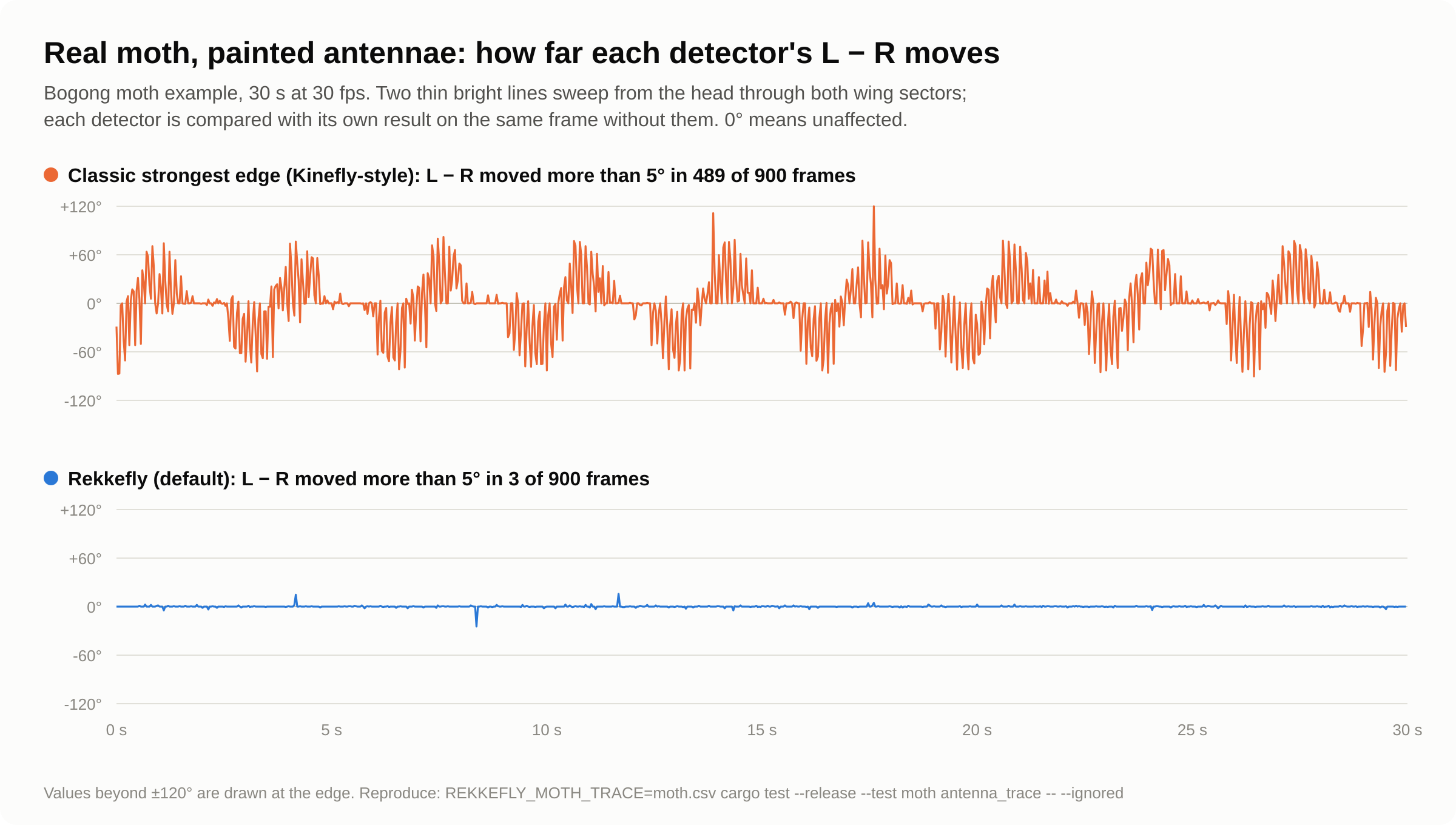
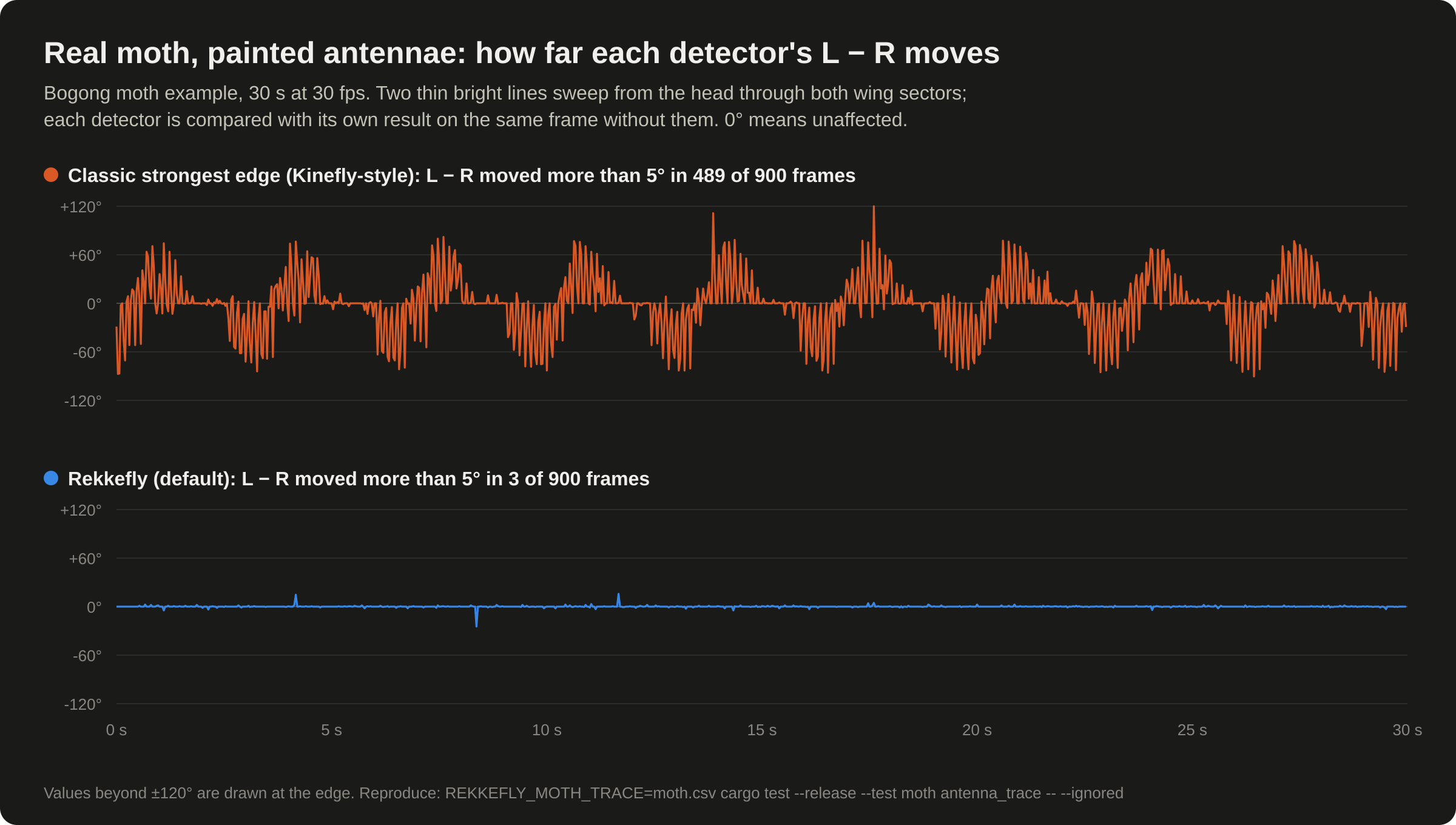
| Real Bogong moth, 900 frames | Classic: L − R moved > 5° | Rekkefly: L − R moved > 5° |
|---|---|---|
| Antennae 2 px wide, gray 150 | 489 | 3 |
| Antennae 3 px, gray 200 | 623 | 3 |
| Faint antennae 1.5 px, gray 110 | 315 | 2 |
| Legs 5 px wide, gray 170 | 632 | 8 |
Image perturbations (every third frame, 300 frames): Rekkefly’s L − R moved by more than 5° on at most 2 frames in every case.
| Perturbation | Classic | Rekkefly |
|---|---|---|
| Darker by 25% | 2 | 2 |
| Brighter by 30% | 1 | 0 |
| Sensor noise, σ = 4 | 20 | 0 |
| JPEG recompression at quality 40 | 11 | 2 |
| Blur, σ = 1.5 px | 11 | 1 |
Without perturbations, Rekkefly’s L − R spreads less (sd 11.1° against 14.4° over the whole clip), and left and right agree better (correlation 0.94 against 0.86 over 300 frames).
cargo test --release --test moth -- --ignored --nocapture
A painted antenna is a controlled stand-in: because it is drawn onto real frames, each detector can be compared with itself on the same frame without it. There is no ground truth for the moth’s wing angles, so accuracy on real footage is shown by robustness, stability and agreement between the wings.
On synthetic flies with known angles
tests/intrusions.rs renders backlit tethered flies with translucent stroke
envelopes, antennae and six segmented legs, with known leading-edge angles. In
some scenes the legs kick through the wing sectors or reach forward in front of
the leading edge; in others, narrow lines drift in and out of the blur.
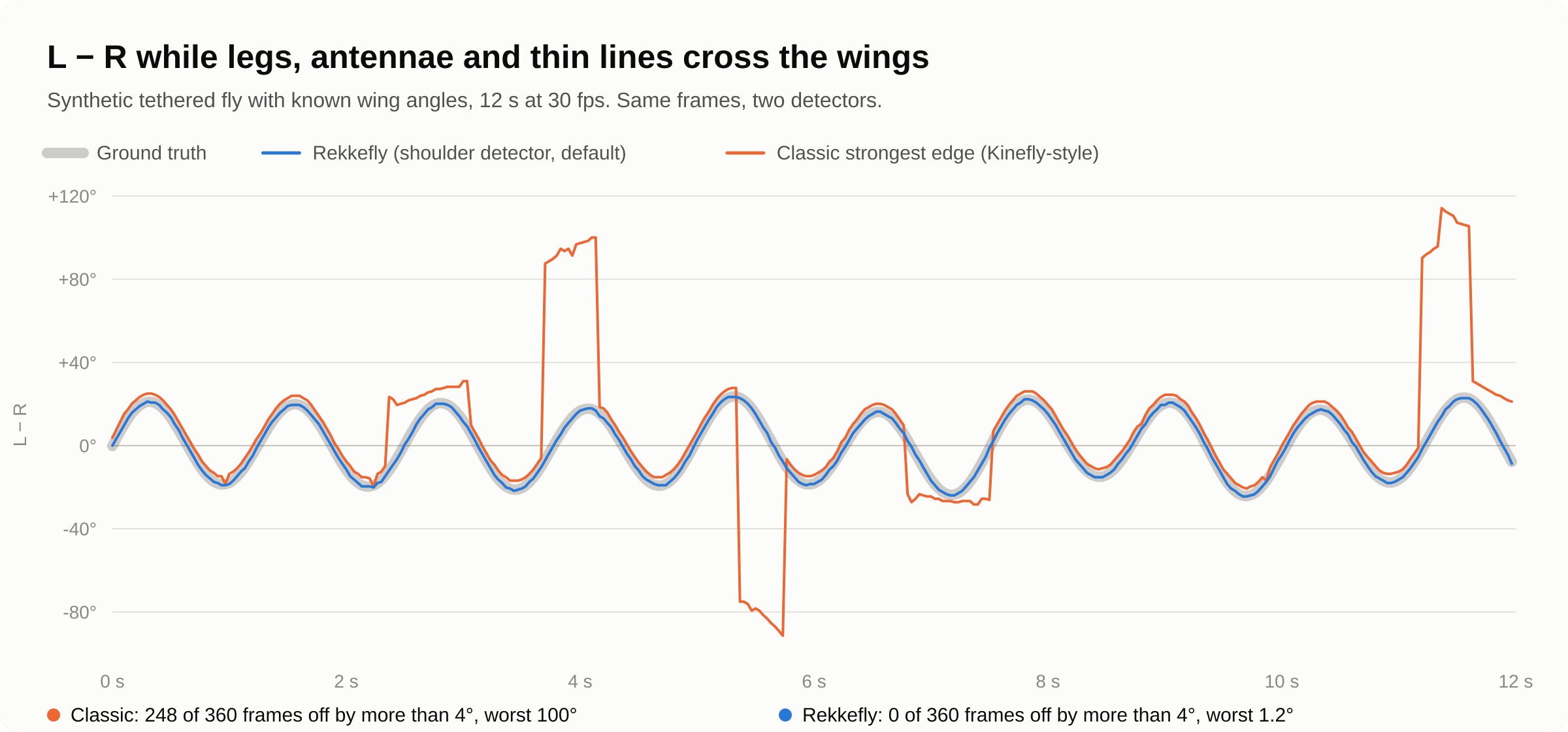
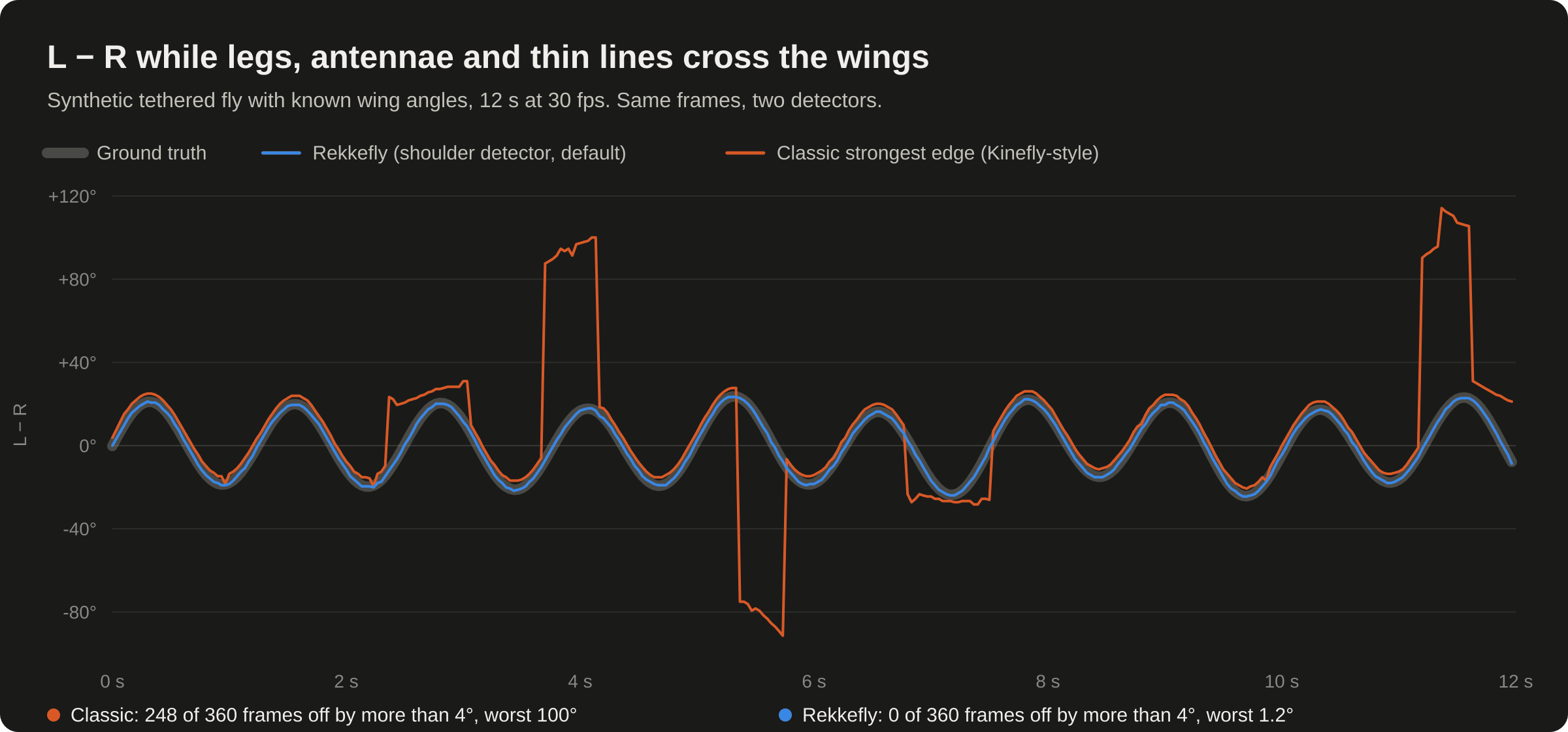
| Scene, 640×480 (wing measurements) | Classic: off by > 4° | Rekkefly: off by > 4° | Classic: worst L − R error | Rekkefly: worst L − R error |
|---|---|---|---|---|
| Clean flight | 0 / 720 | 0 | 0.6° | 0.6° |
| Legs kicking through the wings | 108 / 720 | 0 | 107° | 0.6° |
| Front legs reaching forward | 720 / 720 | 0 | 116° | 0.6° |
| Six narrow lines as dark as the wing blur, drifting in and out of it | 0 / 600 | 0 | 1.3° | 1.2° |
| Six narrow lines twice as dark | 51 / 600 | 0 | 73° | 1.5° |
| A line hugging one wing’s leading edge, 3° outside | 219 / 600 | 0 | 4.6° (biased in 175 of 300 frames) | 0.8° |
| A line 4° inside the blur | 223 / 600 | 0 | 5.6° | 0.6° |
| Faint wings (7% contrast), 10 lines and kicking legs | 90 / 600 | 0 | 101° | 1.5° |
The results hold at 320×240 and 1280×960, with or without background subtraction, and for legs up to 7× thicker. The median angle error stays near 0.25°.
cargo test --release --test intrusions -- --ignored --nocapture
Where it still fails. Out-of-focus lines wider than the 5° filter: with 12 px lines, 71 of 480 wing measurements were off by more than 4° (worst 34°). Ranking by steepness alone gave 158 (worst 79°).
What has not been verified
- Fly footage with known angles, and recordings from your own rigs.
- Physical cameras on each operating system: development had no camera
attached, and CI has none. Please confirm
rekkefly --list-camerasanddevice = "auto"on your rig.
The full record of what was checked for each release is the Validation report.
Performance
Rekkefly is fast enough that tracking is never the bottleneck of a rig: a camera at 30 fps uses about 6% of one core.
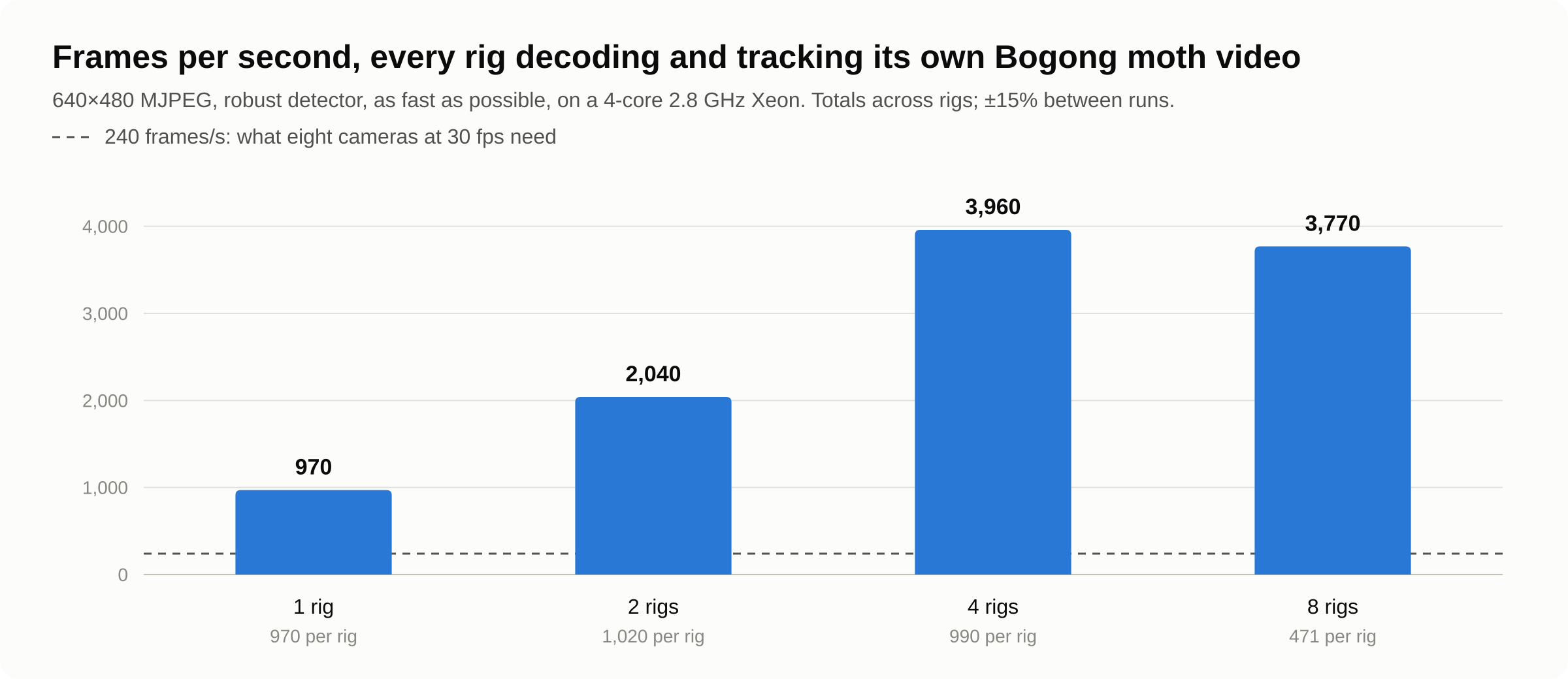
Measured on a 4-core 2.8 GHz Xeon cloud machine, 640×480, both wings at 240 × 72 samples:
| Rekkefly 0.6 | |
|---|---|
| Tracking one frame, robust detector (moth) | ≈ 340 µs (99% under 0.7 ms) |
| Tracking one frame, classic detector (moth) | ≈ 210 µs |
| Video, one rig, MJPEG decoding included | ≈ 800–1,000 frames/s |
| Several rigs at once, totals | ≈ 2,000 frames/s for two, 3,500–4,000 for four or eight |
| One rig at 30 fps, real time | 6% of one core, 10 MB of memory |
| Program size (Linux) | 14 MB, one file |
Against the previous version, on a synthetic 640×480 frame:
| Detector | 0.5.1 | 0.6.0 |
|---|---|---|
Robust (wing_blur) | ≈ 600 µs/frame | ≈ 310 µs/frame (≈ 3,200 frames/s) |
Classic (edge) | ≈ 240 µs/frame | ≈ 235 µs/frame |
Why it is fast
- Tracking runs on each rig’s capture thread, as soon as a frame arrives. There is no queue between the camera and the tracker to add latency.
- No frame copies. Each sector is sampled once per frame from precomputed bilinear positions. Inversion and background subtraction are applied while sampling, not to a copy of the frame. The positions are rebuilt only when the geometry changes, not when a threshold moves.
- Recording is off the capture path. The capture thread hands each frame to encoder threads, which run in parallel only when frames queue up.
- The GUI only draws. The preview refreshes at
preview_fps; tracking uses every frame regardless. - Native code. Rust, compiled for each platform, with SIMD JPEG decoding and encoding.
What costs time
Tracking time grows with the number of samples per sector,
angle_bins × radial_samples, and with the number of enabled parts. The robust
detector takes about 30–60% longer than the classic one, for its bands,
filtering and ranking. Frame size matters only for decoding and recording: tracking samples
the same number of points whatever the resolution.
Measure your own
rekkefly --config my-rig.toml --benchmark --frames 5000   # tracking only, synthetic frame
rekkefly track my-recording.avi --config my-rig.toml      # decoding + tracking
cargo test --release --test moth throughput -- --ignored --nocapture   # 1, 2, 4, 8 rigs
--benchmark measures processing only (foreground preparation and tracking),
without capture, the GUI or outputs, and does not open a camera. Each
measurement also carries processing_us, the tracking time of that frame, so
live performance can be logged too.
Configuration
Every rig has one TOML file: its source, markers, detector settings, outputs and recording. The GUI saves edits back into it automatically, keeping its comments. Configs are validated when loaded; an invalid value is reported with the key’s name, and nothing is changed.
Relative paths in a config are relative to the config file. Edits that change the source, the outputs or the label take effect after Settings → Restart acquisition. Everything else applies to the next frame.
tests/docs.rs checks that every key of the default config appears on this page.
Top level
| Key | Default | Meaning |
|---|---|---|
instance | "rig-a" | Label for the window title, logs and recordings (1–128 characters) |
autosave | true | Save GUI edits automatically, 300 ms after the last change and on close |
preview_fps | 40 | GUI refresh rate, 1–120. Tracking always uses every frame |
[source]
| Key | Default | Meaning |
|---|---|---|
source.kind | "camera" | "camera", "video", "network" (through FFmpeg) or "demo" (simulated fly) |
source.device | "auto" | Camera: "auto", a number from --list-cameras, a device path, or part of the name (choosing a camera) |
source.path | Video file (kind = "video") | |
source.repeat | false | Video: loop at the end |
source.realtime | true | Video: play at the recorded frame rate; false processes as fast as possible |
source.url | Stream URL (kind = "network"), for example rtsp://… | |
source.beat_hz | 0.8 | Simulated fly: how fast its stroke changes, below fps / 2 |
source.width, source.height | 640, 480 | Processing size, 32–8192 each, at most 32 megapixels. Other sizes are scaled to fit without distortion |
source.fps | 30 | Requested camera rate, 1–10000 |
Only the keys of the chosen kind are allowed. A config with kind = "camera"
and a path is an error, so a typo cannot be silently ignored.
Body axis: [head], [tail]
| Key | Default | Meaning |
|---|---|---|
head.x, head.y | 320, 175 | The head end of the body axis (pixels) |
tail.x, tail.y | 320, 330 | The tail end of the body axis (pixels) |
The head and tail must be distinct, and the body axis must not be parallel to the line between the wing hinges.
[tracking]
| Key | Default | Meaning |
|---|---|---|
tracking.asymmetric | false | Edit the wings independently instead of mirroring |
tracking.dark_on_light | true | A dark insect on a light background. false for a bright insect on dark |
tracking.subtract_background | false | Track the difference from the saved background |
tracking.background_path | "rig-a.background.png" | The background image, saved by Save BG |
tracking.angle_bins | 240 | Angular samples per sector, 16–2048 |
tracking.radial_samples | 72 | Radial samples per sector, 4–1024 (bins × samples at most 524,288) |
Parts: [tracking.left], [tracking.right], [tracking.head], [tracking.abdomen]
Each part has the same keys. Here <part> stands for left, right, head or abdomen.
| Key | Default (wings) | Meaning |
|---|---|---|
tracking.<part>.enabled | true (false for head and abdomen) | Track this part |
tracking.<part>.hinge.x, tracking.<part>.hinge.y | left (296, 240), right (344, 240) | The hinge (pixels): where the wing turns, at its base. For the head and abdomen, the pivot |
tracking.<part>.start_deg | left 135, right -85 | Where the sector starts: image degrees, clockwise from image-right |
tracking.<part>.span_deg | 130 | The sector’s angular size, 5–355 |
tracking.<part>.inner_radius | 55 | Inner radius (pixels): just past the body |
tracking.<part>.outer_radius | 185 | Outer radius (pixels): inside the wing blur |
tracking.<part>.method | "wing_blur" (wings), "centroid" (head, abdomen) | "wing_blur" robust, "edge" classic, "centroid". "robust" is accepted for "wing_blur" |
tracking.<part>.primary_edge | "strongest" | Which edge is the angle: "strongest", "toward_head" (leading edge) or "toward_tail" (trailing edge) |
tracking.<part>.threshold | 0.0 | Minimum edge strength, 0–1. 0 reports the strongest edge |
tracking.<part>.max_edges | 2 | Edges reported in angles_rad, 1–8 |
tracking.<part>.spike_width_deg | 5.0 | Robust detector: features narrower than this are ignored, 0–45 |
tracking.<part>.contrast_cap | 0.12 | Robust detector: contrast limit above the background, as a fraction of full brightness |
What these mean, and when to change them: The detectors and Tuning a rig.
[output]
| Key | Default | Meaning |
|---|---|---|
output.zmq_enabled | true | Publish Kinefly-compatible ZMQ |
output.zmq_bind | "tcp://*:9871" | ZMQ publisher address. tcp://127.0.0.1:9871 keeps it on this computer |
output.enabled | true | Send full measurements over UDP |
output.bind | "127.0.0.1:5501" | This rig’s own UDP sending address; every rig needs a different port |
output.target | "127.0.0.1:5601" | Where your UDP receiver listens |
output.jsonl_path | "" | Also write every measurement to this JSONL file. Empty = off. Never overwritten |
[recording]
| Key | Default | Meaning |
|---|---|---|
recording.enabled | false | Record from the start of every run |
recording.directory | "recordings" | Where recording sessions go |
recording.format | "mjpeg" | "mjpeg", "png" or "raw" |
recording.quality | 90 | MJPEG quality, 1–100 |
recording.queue_frames | 32 | Frames that may wait for the disk, 1–256 (at most 256 MiB) |
recording.segment_mb | 1024 | Start a new AVI file at this size, 16–1900 |
See Recording video.
A complete config
The config for the first camera, as shipped, with its comments:
# Rig A: the first camera. UDP 5501 → 5601, ZMQ 9871.
# The GUI saves marker and detector edits back into this file automatically;
# these comments are kept. Run it with:  rekkefly --config <this file>
# Every setting is explained in the README ("Configuration reference").

# Name shown in the window title, logs and recording folder names.
instance = "rig-a"
# How often the GUI preview refreshes. Tracking always uses every frame.
preview_fps = 40
# Save GUI edits 300 ms after you stop dragging (and on close).
autosave = true

[source]
# kind: "camera", "video", "network" or "demo" (simulated fly).
kind = "camera"
# device: "auto" = first camera that opens; a number = its position in
# `rekkefly --list-cameras` (0 = first); or a device path such as
# /dev/v4l/by-id/... (Linux, stable across reboots), or part of the camera name.
device = "auto"
# Processing size and requested frame rate. Other camera modes are scaled to fit.
width = 640
height = 480
fps = 30

# Body axis: drag the magenta head dot and cyan tail dot onto the insect.
[head]
x = 320.0
y = 175.0

[tail]
x = 320.0
y = 330.0

[tracking]
# false: the wings mirror each other across the head–tail axis while you edit.
asymmetric = false
# Angular and radial sampling of each sector (more = finer, slower).
angle_bins = 240
radial_samples = 72
# true: dark insect on a light (backlit) background; false: bright insect on dark.
dark_on_light = true
# Track the difference from a saved empty-scene image ("Save BG" in the toolbar).
subtract_background = false
background_path = "rig-a.background.png"

# Wing sectors. Angles are image degrees, clockwise from image-right.
# method: "wing_blur" = robust, ignores legs and antennae (default)
#         "edge"      = classic strongest edge of the averaged profile
#         "centroid"  = intensity centroid (used for head/abdomen)
# threshold: 0 reports the strongest edge however faint; raise it to reject noise.
# spike_width_deg: robust mode ignores dark features narrower than this (legs, antennae).
# contrast_cap: robust mode limits contrast so opaque legs cannot outweigh a translucent wing.

[tracking.left]
enabled = true
start_deg = 135.0
span_deg = 130.0
inner_radius = 55.0
outer_radius = 185.0
method = "wing_blur"
threshold = 0.0
max_edges = 2
primary_edge = "strongest"
contrast_cap = 0.12
spike_width_deg = 5.0

[tracking.left.hinge]
x = 296.0
y = 240.0

[tracking.right]
enabled = true
start_deg = -85.0
span_deg = 130.0
inner_radius = 55.0
outer_radius = 185.0
method = "wing_blur"
threshold = 0.0
max_edges = 2
primary_edge = "strongest"
contrast_cap = 0.12
spike_width_deg = 5.0

[tracking.right.hinge]
x = 344.0
y = 240.0

[tracking.head]
enabled = false
start_deg = -125.0
span_deg = 70.0
inner_radius = 12.0
outer_radius = 62.0
method = "centroid"
threshold = 0.0
max_edges = 2
primary_edge = "strongest"
contrast_cap = 0.12
spike_width_deg = 5.0

[tracking.head.hinge]
x = 320.0
y = 205.0

[tracking.abdomen]
enabled = false
start_deg = 55.0
span_deg = 70.0
inner_radius = 15.0
outer_radius = 88.0
method = "centroid"
threshold = 0.0
max_edges = 2
primary_edge = "strongest"
contrast_cap = 0.12
spike_width_deg = 5.0

[tracking.abdomen.hinge]
x = 320.0
y = 265.0

[output]
# Full measurements as JSON over UDP, one datagram per frame.
enabled = true
# This rig's own sending port: every rig needs a different one.
bind = "127.0.0.1:5501"
# Where your receiver listens (python3 examples/receive_udp.py --port 5601).
target = "127.0.0.1:5601"
# Also write every measurement to this JSONL file (relative to this config). Empty = off.
jsonl_path = ""
# Kinefly-compatible ZMQ publisher. Subscribers connect to tcp://<this computer>:9871.
zmq_enabled = true
zmq_bind = "tcp://*:9871"

[recording]
# Start recording as soon as this rig starts (the Record button works any time).
enabled = false
# Folder for recordings, relative to this config.
directory = "recordings"
# "mjpeg" = small (about 10–20× smaller than raw), "png" = lossless, "raw" = lossless and largest.
format = "mjpeg"
# MJPEG quality 1–100; 90 is visually lossless for wing tracking.
quality = 90
# Frames buffered for the disk writer, and the size of each AVI file.
queue_frames = 32
segment_mb = 1024
The other shipped configs are in
configs/:
camera-b.toml (second camera and ports), bogong-moth.toml (the example video),
demo.toml (the simulated fly), network.toml (an RTSP stream) and
rigs.toml (a rig manifest).
Rig manifests
rigs.toml lists rigs to start together; its keys are in
Several rigs at once.
Command line
rekkefly                               open the window with the first free rig config
rekkefly VIDEO [--loop] [--fast]       track a video file
rekkefly --config FILE                 a specific rig config
rekkefly --rigs [rigs.toml]            start every rig in a manifest
rekkefly --list-cameras [--json]       show camera numbers, names and paths
rekkefly track VIDEO [options]         track a whole video as fast as possible
rekkefly clip IN OUT [options]         cut or convert a video
rekkefly mcp [--config-dir DIR]        Model Context Protocol server on stdin/stdout
On a Mac, use /Applications/Rekkefly.app/Contents/MacOS/rekkefly in place of
rekkefly, or add a link.
Which config is used
--config FILE, if given.- Otherwise the first rig config not already open in another window:
camera-a.toml, thencamera-b.toml, then a newcamera-c.tomland so on, in the folder Rekkefly uses for configs (Files and folders).
Run-only overrides
These change the run, never the saved config:
| Option | Overrides |
|---|---|
--device SEL | The camera |
--video FILE (or the VIDEO argument) | Track a video instead of the camera |
--demo | Use the simulated fly |
--label NAME | The window title, instance name and recording prefix |
--zmq-port P | The ZMQ publisher port |
--udp-port P | The local UDP sending port |
--udp-target IP:PORT | The UDP receiver |
--record | Record from the start |
Exit status
0 on success; non-zero, with the reason on standard error, on any error. In headless runs a missing camera, a busy port or an invalid config is an error.
Environment variables
| Variable | Effect |
|---|---|
REKKEFLY_FFMPEG | Path to the FFmpeg program, for formats other than AVI and for network streams. Default: an ffmpeg beside Rekkefly, then on PATH |
REKKEFLY_SAMPLE | A video to play instead of the Bogong moth when no camera opens |
The Rekke 0.5 names, REKKE_FFMPEG and REKKE_SAMPLE, still work.
Full help
The complete output of rekkefly --help and of each subcommand’s --help.
tests/docs.rs keeps this text identical to the program’s.
$ rekkefly --help
Rekkefly, the new Kinefly: track insect wings from cameras or video files.

Run without arguments to open the first camera (or a sample video if none is connected).
Examples:
  rekkefly                                   open the GUI
  rekkefly recording.avi                     track a video file
  rekkefly --device 1 --label arena-2        second camera, custom label
  rekkefly --rigs rigs.toml                  every rig in a manifest, one window each
  rekkefly --rigs rigs.toml --headless --record
  rekkefly --list-cameras
  rekkefly track recording.avi --csv angles.csv
  rekkefly clip big.avi sample.avi --start 60 --duration 30
  rekkefly mcp                               serve AI agents (Model Context Protocol)

Usage: rekkefly [OPTIONS] [VIDEO]
       rekkefly <COMMAND>

Commands:
  clip   Cut part of a video into a new, usually much smaller, AVI
  track  Track a whole video as fast as possible and summarise the wing angles
  mcp    Serve the Model Context Protocol on stdin/stdout, for AI agents and automation: cameras, configs, rigs, live angles, snapshots, videos
  help   Print this message or the help of the given subcommand(s)

Arguments:
  [VIDEO]
          A video file to track (AVI natively; other formats need FFmpeg)

Options:
  -c, --config <CONFIG>
          This instance's configuration (TOML). Edits in the GUI are saved here

      --rigs [<RIGS>]
          Launch every enabled rig in this manifest, each as its own process

      --device <DEVICE>
          Use this camera for this run: auto, a number from --list-cameras, a device path or part of the camera name. Not saved to the config

      --video <FILE>
          Track this video file for this run (same as the VIDEO argument)

      --fast
          With a video: process as fast as possible instead of at its frame rate

      --loop
          With a video: play it in a loop

      --label <LABEL>
          Window title, instance name and recording prefix for this run

      --zmq-port <PORT>
          Publish Kinefly-format ZMQ on this TCP port for this run

      --udp-port <PORT>
          Send full UDP measurements from this local port for this run

      --udp-target <IP:PORT>
          Send full UDP measurements to this IP:port for this run

      --record
          Record video to this instance's recording directory

      --init
          Create a sample configuration at --config and exit (never overwrites)

      --headless
          Run acquisition and output without a GUI

      --frames <FRAMES>
          Stop after this many processed frames

      --list-cameras
          List cameras with the numbers to use for `device`, then exit

      --demo
          Use the simulated fly instead of the camera for this run

      --benchmark
          Benchmark processing of a fixed synthetic frame; does not acquire a camera

      --json
          Print machine-readable JSON (with --list-cameras, --benchmark, --headless)

      --screenshot <SCREENSHOT>
          Capture the GUI to a PNG after two seconds, then exit

  -h, --help
          Print help (see a summary with '-h')

  -V, --version
          Print version

$ rekkefly track --help
Track a whole video as fast as possible and summarise the wing angles.

Without --config the video's own markers are used (a .toml beside it, or the Bogong moth example's), else the defaults.

Usage: rekkefly track [OPTIONS] <VIDEO>

Arguments:
  <VIDEO>


Options:
      --config <CONFIG>
          Markers and detector settings to use (never written)

      --method <METHOD>
          Override the wing detector for both wings

          Possible values:
          - robust:  Ignores legs and antennae (default)
          - classic: Kinefly's strongest edge

      --csv <CSV>
          Write per-frame angles (degrees) and tracking time here

      --jsonl <JSONL>
          Write every full measurement as JSON lines here

      --frames <FRAMES>
          Stop after this many frames

      --json
          Print the summary as JSON

  -h, --help
          Print help (see a summary with '-h')

$ rekkefly clip --help
Cut part of a video into a new, usually much smaller, AVI.

Reads AVI natively (including Rekkefly/Wingtrace recordings); other formats need FFmpeg. Never overwrites an existing file.

Usage: rekkefly clip [OPTIONS] <INPUT> <OUTPUT>

Arguments:
  <INPUT>


  <OUTPUT>


Options:
      --start <START>
          Seconds to skip from the start

          [default: 0]

      --duration <DURATION>
          Seconds to keep (default: until the end)

      --format <FORMAT>
          mjpeg (small), png (lossless) or raw (lossless, large)

          [default: mjpeg]
          [possible values: mjpeg, png, raw]

      --quality <QUALITY>
          MJPEG quality 1–100

          [default: 90]

      --every <EVERY>
          Keep every Nth frame

          [default: 1]

  -h, --help
          Print help (see a summary with '-h')

$ rekkefly mcp --help
Serve the Model Context Protocol on stdin/stdout, for AI agents and automation: cameras, configs, rigs, live angles, snapshots, videos.

Add it to an MCP client, for example:  claude mcp add rekkefly -- rekkefly mcp

Usage: rekkefly mcp [OPTIONS]

Options:
      --config-dir <CONFIG_DIR>
          Folder of rig configs (default: the folder Rekkefly itself uses)

  -h, --help
          Print help (see a summary with '-h')
Measurement format
Every tracked frame produces one measurement. It is sent as one UDP datagram,
written as one line of a JSONL file (output.jsonl_path, rekkefly track --jsonl), and summarised on ZMQ in the Kinefly format. The schema is defined by
Measurement in src/tracker.rs; schema_version changes if a field’s meaning
ever does.
Measurement
| Field | Type | Meaning |
|---|---|---|
schema_version | integer | Currently 1 |
instance | string | The rig’s label |
sequence | integer | The source’s frame number |
timestamp_ns | integer | When the frame arrived, nanoseconds since 1970 (host time, not a camera timestamp) |
elapsed_ns | integer | Time since the rig started, nanoseconds (0 in rekkefly track) |
width, height | integer | Processing size, pixels |
capture_fps | number | The source’s measured frame rate (0 in rekkefly track) |
processing_us | number | Time spent tracking this frame, microseconds |
background_subtracted | boolean | Whether background subtraction was applied |
left, right, head, abdomen | object | Each part’s state (below) |
left_minus_right_rad | number or null | L − R, radians |
left_plus_right_rad | number or null | L + R, radians |
Part state
| Field | Type | Meaning |
|---|---|---|
enabled | boolean | Whether the part is tracked |
angle_rad | number or null | The reported angle: relative to the body axis, wings positive toward the head |
image_angle_rad | number or null | The same edge as an image angle, clockwise from image-right |
angles_rad | array of numbers | Every detected edge, the reported one first (up to max_edges) |
gradients | array of numbers | Each edge’s signed strength, in the same order |
strength | number | The reported edge’s strength |
peak_gradient | number | The strongest edge before the threshold was applied: for setting threshold |
coverage | number | Fraction of the sector inside the image, 0–1 |
intensity | number | Mean normalized intensity in the sector, 0–1 |
radius_px | number or null | Centroid method only: the mean radius |
Missing or disabled angles are null, never zero or a stale value.
Example
One measurement from the Bogong moth, formatted:
{
  "schema_version": 1,
  "instance": "rig-a",
  "sequence": 0,
  "timestamp_ns": 1791859983969667394,
  "elapsed_ns": 0,
  "width": 640,
  "height": 480,
  "capture_fps": 0.0,
  "processing_us": 1242.68,
  "background_subtracted": false,
  "left": {
    "enabled": true,
    "angle_rad": -0.37081718,
    "image_angle_rad": -0.38192773,
    "angles_rad": [-0.37081718, 0.28641963],
    "gradients": [-0.033694424, 0.0050776303],
    "radius_px": null,
    "intensity": 0.34237066,
    "strength": 0.033694424,
    "peak_gradient": 0.033694424,
    "coverage": 1.0
  },
  "right": {
    "enabled": true,
    "angle_rad": -0.2743702,
    "image_angle_rad": 3.4048524,
    "angles_rad": [-0.2743702, 0.4193797],
    "gradients": [0.0647008, -0.0024671927],
    "radius_px": null,
    "intensity": 0.37786517,
    "strength": 0.0647008,
    "peak_gradient": 0.0647008,
    "coverage": 1.0
  },
  "head": {"enabled": false, "angle_rad": null, "image_angle_rad": null, "angles_rad": [], "gradients": [], "radius_px": null, "intensity": 0.0, "strength": 0.0, "peak_gradient": 0.0, "coverage": 0.0},
  "abdomen": {"enabled": false, "angle_rad": null, "image_angle_rad": null, "angles_rad": [], "gradients": [], "radius_px": null, "intensity": 0.0, "strength": 0.0, "peak_gradient": 0.0, "coverage": 0.0},
  "left_minus_right_rad": -0.09644699,
  "left_plus_right_rad": -0.6451874
}
(capture_fps is 0 here because rekkefly track processes a file as fast as
possible; live sources report their rate.)
Kinefly ZMQ message
| Field | Source |
|---|---|
x | left.angle_rad, or 0.0 if missing |
y | right.angle_rad, or 0.0 if missing |
yaw | x − y |
z, pitch, roll | 0.0 |
frame_number | sequence |
timestamp_unix | timestamp_ns in seconds |
The message is one ZMQ frame of JSON, written byte for byte as the Kinefly
Docker bridge writes it: the keys in the order timestamp_unix, pitch, y,
x, yaw, z, roll, frame_number, with ", " and ": " between them, and
numbers as Python writes them (0.0, 1e-05):
{"timestamp_unix": 1700000000.125, "pitch": 0.0, "y": -0.5, "x": 0.25, "yaw": 0.75, "z": 0.0, "roll": 0.0, "frame_number": 77}
CSV from rekkefly track
| Column | Meaning |
|---|---|
frame | Frame index in the video |
seconds | The frame’s time in the video |
left_deg, right_deg | Wing angles, degrees |
left_minus_right_deg, left_plus_right_deg | L − R and L + R, degrees |
head_deg, abdomen_deg | Head and abdomen angles, degrees |
processing_us | Tracking time, microseconds |
Missing values are empty cells.
MCP tool schemas
Every tool rekkefly mcp offers, with its arguments, as the server reports
them in tools/list. Unknown arguments are rejected, and a tool that fails
returns isError: true with the reason. How to connect a client, and an
example session: AI agents (MCP).
| Tool | What it does | Read-only |
|---|---|---|
list_cameras | List cameras | Yes |
list_configs | List rig configs | Yes |
get_config | Read a config | Yes |
update_config | Change a config | No |
start_rig | Start a rig | No |
launch_rigs | Start every rig in a manifest | No |
rig_status | Rig status and live angles | Yes |
measure | Measure a rig for a while | Yes |
stop_rig | Stop a rig | No |
record | Start or stop recording | No |
save_background | Save the background | No |
snapshot | Look at the tracking | Yes |
track_video | Track a video file | No |
clip_video | Cut a video | No |
benchmark | Measure tracking speed | Yes |
list_cameras
Cameras this computer can open, with the numbers to use as device.
No arguments.
list_configs
Every rig config (.toml) in the config folder with its camera or video, outputs and whether it is running, plus rig manifests (rigs.toml).
No arguments.
get_config
A rig config as JSON (every field) and as its commented TOML file, which explains each setting.
| Argument | Type | Required | Meaning |
|---|---|---|---|
config | string | Yes | A config name in the config folder (camera-a, bogong-moth) or a path to a .toml file. |
update_config
Change fields of a rig config and save it (comments in the file are kept). changes is a JSON merge patch on the get_config JSON, for example {“tracking”: {“left”: {“spike_width_deg”: 6}}} or {“head”: {“x”: 320, “y”: 170}}. Invalid values are rejected and nothing is written. A rig running this config picks up marker and detector changes at once; source and output changes need a restart.
| Argument | Type | Required | Meaning |
|---|---|---|---|
changes | object | Yes | The fields to change, nested as in get_config. |
config | string | Yes | A config name in the config folder (camera-a, bogong-moth) or a path to a .toml file. |
create | boolean | Create the config from the defaults if it does not exist (default false). |
start_rig
Start tracking headless with a config and publish its outputs (Kinefly ZMQ, UDP). Give a camera device, a video file or demo to override the config’s source for this run only; the other overrides apply to this run only too. Returns the rig’s status once it shows its first frame (or fails).
| Argument | Type | Required | Meaning |
|---|---|---|---|
config | string | A config name or path. Default: the next free rig config (camera-a, camera-b, …). | |
demo | boolean | Track the simulated fly for this run. | |
device | string | Camera for this run: auto, a number from list_cameras, a device path or part of the name. | |
fast | boolean | With a video: as fast as possible instead of at its frame rate. | |
frames | integer, ≥ 0 | Stop after this many frames. | |
label | string | Label (instance name) for this run; also the rig’s id here. | |
loop | boolean | With a video: play it in a loop. | |
record | boolean | Record video from the start. | |
udp_port | integer, ≥ 0 | Send UDP measurements from this local port for this run. | |
udp_target | string | Send UDP measurements to this IP:port for this run. | |
video | string | Track this video file for this run (AVI natively; other formats need FFmpeg). Uses the video’s own markers if it has them. | |
wait_seconds | number, ≥ 0 | How long to wait for the first frame (default 5). | |
zmq_port | integer, ≥ 0 | Publish Kinefly ZMQ on this TCP port for this run. |
launch_rigs
Start every enabled rig in a rig manifest (rigs.toml): each with its own label, camera or video and ports. All or none: if one cannot start, the others are stopped again.
| Argument | Type | Required | Meaning |
|---|---|---|---|
demo | boolean | Use the simulated fly for every rig (to test ports and labels). | |
frames | integer, ≥ 0 | Stop each rig after this many frames. | |
manifest | string | Manifest name or path (default rigs). | |
record | boolean | Record every rig. |
rig_status
Status of one running rig (or all): frames, frame rate, tracking time, the latest wing angles in degrees (left, right, L−R, head, abdomen), recording and outputs.
| Argument | Type | Required | Meaning |
|---|---|---|---|
rig | string | A running rig’s label, as rig_status lists it. |
measure
Collect every frame of a running rig for some seconds and summarise each angle in degrees (frames measured, mean, spread, minimum, maximum), for example the mean L−R of a trial. skipped_frames counts gaps in the camera’s frame numbers: exposures the camera dropped, or that could not be delivered. Optionally writes every frame to a CSV. Blocks for seconds.
| Argument | Type | Required | Meaning |
|---|---|---|---|
csv | string | Also write every frame here (degrees). | |
rig | string | Yes | A running rig’s label, as rig_status lists it. |
seconds | number, ≥ 0 | How long to measure (default 5, at most 600). |
stop_rig
Stop a rig (or every rig if none is named), finishing any recording, and return its final status.
| Argument | Type | Required | Meaning |
|---|---|---|---|
rig | string | A running rig’s label, as rig_status lists it. |
record
Start or stop recording a running rig’s camera to its recording folder (MJPEG AVI by default).
| Argument | Type | Required | Meaning |
|---|---|---|---|
enabled | boolean | Yes | true starts, false stops. |
rig | string | Yes | A running rig’s label, as rig_status lists it. |
save_background
Save the rig’s next frame as its background image, for background subtraction. Capture an empty scene first.
| Argument | Type | Required | Meaning |
|---|---|---|---|
rig | string | Yes | A running rig’s label, as rig_status lists it. |
snapshot
An image of a frame with the tracking drawn on it (body axis, sectors, detected edges) and its angles. Use rig for the latest live frame, or video (with frame and optionally config) for any frame of a file. Check this after moving markers.
| Argument | Type | Required | Meaning |
|---|---|---|---|
config | string | With video: the config whose markers to use (default: the video’s own, or the defaults). | |
frame | integer, ≥ 0 | With video: the frame number (default 0). | |
rig | string | A running rig’s label, as rig_status lists it. | |
video | string | A video file, instead of a running rig. | |
width | integer, ≥ 0 | Image width in pixels (default 640). |
track_video
Track every frame of a video as fast as possible and summarise it: frames per second, tracking time, and mean, spread and range of each angle. Optionally writes a CSV (one row per frame) and the full measurements as JSON lines.
| Argument | Type | Required | Meaning |
|---|---|---|---|
config | string | Config whose markers and settings to use (default: the video’s own markers, or the defaults). | |
csv | string | Write per-frame angles here. | |
frames | integer, ≥ 0 | Stop after this many frames. | |
jsonl | string | Write full measurements here. | |
method | string: "robust", "classic" | Override the wing detector: robust (ignores legs and antennae) or classic (Kinefly’s strongest edge). | |
video | string | Yes | The video file. |
video_markers | boolean | Use the video’s own markers (a .toml beside it) even when a config is given. |
clip_video
Cut part of a video into a new, usually much smaller AVI. Never overwrites.
| Argument | Type | Required | Meaning |
|---|---|---|---|
duration | number, ≥ 0 | Seconds to keep (default: to the end). | |
every | integer, ≥ 0 | Keep every Nth frame. | |
format | string: "mjpeg", "png", "raw" | mjpeg (small, default), png (lossless) or raw. | |
input | string | Yes | The video to cut (AVI natively; other formats need FFmpeg). |
output | string | Yes | The new AVI file. |
quality | integer, ≥ 0 | MJPEG quality 1–100 (default 90). | |
start | number, ≥ 0 | Seconds to skip. |
benchmark
Tracking time per frame for a config on a synthetic frame (no camera needed).
| Argument | Type | Required | Meaning |
|---|---|---|---|
config | string | Config to measure (default: the defaults, 640×480). | |
frames | integer, ≥ 0 | Frames to time (default 2000). |
Files and folders
Where configs live
| Installed as | Configs folder |
|---|---|
| Mac app | ~/Library/Application Support/Rekkefly/configs/ |
| Windows installer | %APPDATA%\Rekkefly\configs\ |
Ubuntu .deb | ~/.config/rekkefly/configs/ (or $XDG_CONFIG_HOME/rekkefly/configs/) |
| Portable folder | configs/ inside the folder |
| A clone of the source | configs/ in the clone |
Installed apps create the folder on first launch, with camera-a.toml,
camera-b.toml, demo.toml, bogong-moth.toml, network.toml and
rigs.toml. Settings from Rekke 0.5 (and earlier Wingtrace installs) are copied
over once. Uninstalling keeps the folder.
How Rekkefly picks a config
Without --config, Rekkefly looks, in order, for:
- In a Mac app: the user configs folder above.
- In the current folder:
rekkefly.toml, thenconfigs/camera-a.toml. - Beside the program:
configs/camera-a.toml(portable folders). - In an installed app: the user configs folder above.
- Otherwise
rekkefly.tomlin the current folder.
If that config is already open in another window, the next free
camera-*.toml beside it is used, and a new one (camera-c.toml, …) is created
when all are open. The MCP server looks up config names in the same folder;
rekkefly mcp --config-dir DIR uses another.
Beside each config
| File | Written by | Contents |
|---|---|---|
camera-a.toml | You, and the GUI’s autosave | The rig’s settings |
rig-a.background.png | Save BG | The background image (tracking.background_path) |
.camera-a.toml.lock | Rekkefly, while the config is open | An operating-system file lock that stops two windows or rigs using the same config. The system releases it when Rekkefly exits or crashes, so there is nothing to clean up |
recordings/<label>-<time>-<pid>/ | Record | One recording session (contents) |
output.jsonl_path, if set | The JSONL output | One measurement per line |
All paths inside a config are relative to the config file.
Samples
| Location | Purpose |
|---|---|
samples/bogong-moth.avi (in the app or portable folder) | The Bogong moth example |
<user folder>/samples/sample.avi, or REKKEFLY_SAMPLE | Your own example, played instead of the moth when no camera opens |
The user folder is the parent of the configs folder, for example
~/Library/Application Support/Rekkefly/ on a Mac.
Writes are safe
Configs are written atomically: the new contents go to a temporary file that replaces the old one in a single step, so a crash or power loss can never leave a half-written config. Comments and layout in the file are kept. Rekkefly never overwrites a recording, a clip or a JSONL file that already exists.
Troubleshooting
Find your symptom below. If it is not here, search the
issues or
open one: include
rekkefly --version, your system, and if you can, a short clip
(rekkefly clip recording.avi clip.avi --duration 5).
Installing and starting
| Problem | Fix |
|---|---|
| Mac: “Rekkefly cannot be opened” | The app is not notarized. Run xattr -dr com.apple.quarantine "/Applications/Rekkefly.app" once, or use System Settings → Privacy & Security → Open Anyway (details) |
| Windows: SmartScreen warning | The installer is not code-signed. Choose More info → Run anyway |
| Windows portable folder: a launcher closes at once (0.6.0) | The 0.6.0 portable launchers call rekke.exe. Run rekkefly.exe directly, or edit the .cmd file to say rekkefly.exe. Fixed in 0.6.1; the installer is not affected |
Ubuntu: the .deb will not install | Use sudo apt install ./rekkefly_<version>_amd64.deb (with ./), so apt fetches the dependencies. Ubuntu 22.04 or newer is needed |
| “… is already open in another Rekkefly window” | Each config can be open in one place at a time. Close the other window, or use --config with another file |
Cameras
| Problem | Fix |
|---|---|
| The moth plays instead of my camera | No camera could be opened; the banner says why. Connect the camera and click Retry camera |
| Mac: black image or no camera | System Settings → Privacy & Security → Camera: turn Rekkefly (or your terminal) on |
| Linux: “Permission denied” for /dev/video0 | sudo usermod -aG video $USER, then log out and back in |
Linux: auto failed, but 0 worked (Rekke 0.5) | Fixed in 0.6: metadata-only /dev/video* nodes are skipped and cameras are tried in order. Check the numbers with rekkefly --list-cameras |
| “Cannot open camera … may be in use” | Close the other program or window using that camera, or give this rig another device |
| The wrong camera opens after re-plugging | Use a stable selector: a /dev/v4l/by-id/... path on Linux, or part of the camera’s name (choosing a camera) |
| The frame rate is lower than requested | The camera may not offer that mode at that size, or the exposure is longer than the frame period. Shorten the exposure, or use a smaller size |
| Two cameras on one USB hub drop out | USB bandwidth. Use separate USB controllers or compressed (MJPEG) camera modes |
Tracking
| Problem | Fix |
|---|---|
| L − R is noisy or spiky | Put the hinges on the wing bases, the inner radius just past the body and the outer radius inside the blur. Keep the sectors off the body, legs and head. Watch the debug traces while you adjust (tuning) |
| The edge jumps to a leg | Make sure Ignore legs is ticked (method = "wing_blur"). Increase spike_width_deg for thick legs |
| The angle sits at the sector’s limit | The stroke goes beyond the sector: widen the span |
| The angle is reported while the insect is not flying | Raise threshold above the strength of the background noise (see the peak value in Settings) |
| Angles look inverted or wrong on a bright insect | Untick Invert (dark_on_light = false) for a bright insect on a dark background |
| Angles changed after moving the camera | Angles are relative to the body axis, so only the markers need moving: drag them back onto the insect |
Video files
| Problem | Fix |
|---|---|
| A video won’t open | AVI plays natively. Other formats need FFmpeg on your PATH, or REKKEFLY_FFMPEG=/path/to/ffmpeg |
| A video plays with the wrong markers | A <video>.toml beside the video provides its markers. Use --config to choose others |
rekkefly clip says the file exists | It never overwrites. Choose another output name |
Outputs
| Problem | Fix |
|---|---|
| “Outputs off: Bind output port …” | Another program or rig uses that port, for example the old Kinefly bridge. Tracking continues in the window. Choose another port in Settings → Instance / output |
| My ZMQ subscriber receives nothing | Subscribe to everything (b""), connect to the rig computer’s address and port, and allow the port through its firewall. Messages sent before the subscriber connected are not delivered |
| Unity (NetMQ) receives nothing, while PlotJuggler or Python do (0.6.0) | Rekkefly 0.6.0 spoke only ZMTP 3, and older NetMQ releases (3.x and 4.0.0.x, common in Unity projects) speak ZMTP 2.0, so the connection failed silently. Install 0.6.2 or newer, which negotiates like libzmq: the Unity build needs no change |
| My receiver misses messages | ZMQ drops messages for a subscriber more than 1,000 behind, so tracking never waits. Read continuously, in a thread of its own if needed |
| UDP receiver gets nothing | Check that output.target is the receiver’s address and port, and that the receiver binds that port |
Recording
| Problem | Fix |
|---|---|
| Recording stopped: “queue is full” | The disk cannot keep up. Use format = "mjpeg", a lower resolution or frame rate, or a faster disk |
| Recordings are too large | Use MJPEG (the default) and lower quality; shrink old raw recordings with rekkefly clip |
Still stuck?
Start Rekkefly from a terminal to see every message, and include them in an issue.
Questions and answers
Which insects does Rekkefly work with?
Any tethered insect whose beating wings leave a motion-blur envelope in the image: flies (Drosophila and larger), bees, moths. The example that ships with it is a Bogong moth, and the synthetic test flies have six legs, antennae and translucent wings.
Does it need a particular camera?
No. Any camera your system can use as a webcam works: USB machine-vision cameras with UVC support, webcams, and built-in cameras. For wing-stroke amplitude, the exposure should be long enough to blur several wingbeats into an envelope. Video files and network streams work too.
How fast is it? Can it keep up with a high-speed camera?
Tracking takes about 0.3 ms per 640×480 frame, so one rig can process about 3,000 frames/s of tracking alone, and about 1,000 frames/s when it also has to decode MJPEG video. See Performance.
What is the latency?
A frame is tracked on the capture thread the moment it arrives, and its measurement is published immediately: the added delay is the tracking time (about 0.3 ms) plus sending a small message. The camera’s own exposure and transfer usually dominate.
Can I use it with my existing Kinefly experiment code?
Yes. Rekkefly publishes the same ZMQ JSON message as the Kinefly Docker bridge, on the same default port. See Coming from Kinefly.
Does it measure wingbeat frequency?
Not yet. Rekkefly measures stroke amplitude (the envelope’s leading edge), as Kinefly does. Wingbeat frequency and stopped-flight detection are not implemented.
Is it accurate?
On synthetic flies with known angles, the median error is about 0.25°, and no frame was off by more than 4° even with legs kicking through the wings. On the real Bogong moth, which has no ground truth, painted antennae moved L − R on 3 of 900 frames. See Evidence, including what has not been verified yet.
Why “Rekkefly”?
ರೆಕ್ಕೆ (rekke) is Kannada for wing. Rekkefly is the wing-tracker for flies, and the successor to Kinefly.
Is it free?
Yes: free and open source under the MIT License, for any use, including commercial. If you use it in published research, please cite it.
Can an AI agent run my rigs?
Yes, through the built-in MCP server. It can start and stop rigs, look at the tracking overlay, move markers, record and measure trials. Agents only get the access you give the MCP client that runs it.
Does Rekkefly send data anywhere?
Only where you configure it: ZMQ and UDP measurements to the addresses in the config. It has no telemetry and checks for nothing online.
Can I run it without a screen?
Yes: --headless, or rigs from a manifest with --rigs … --headless. A build
without the GUI and camera support is also possible
(cargo build --release --no-default-features) for offline analysis on servers.
Coming from Kinefly
Rekkefly does the same job as Kinefly, keeps its conventions and speaks the Kinefly Docker bridge’s ZMQ format. Moving an existing setup takes minutes.
Two projects Rekkefly stands on
Kinefly made real-time wing tracking practical for tethered-flight rigs. It measures the leading edge of each wing’s motion-blur stroke envelope inside annular sectors around the wing hinges, together with head and abdomen angles, and publishes the results for closed-loop experiments. Many labs built their arenas around it. Kinefly was written for ROS 1 and Python 2, both now end-of-life, and it is no longer maintained. Installing it today means fighting old operating systems and dependency chains (the 2015 installation notes give a flavour), and the old stack can be fragile in long experiments.
Kinefly Docker kept Kinefly
alive. It packed the original ROS stack into a container and added
ros_zmq_bridge.py, which re-publishes the wing angles as simple JSON over ZMQ,
so any language could listen without ROS. Experiments ran on it; its message
format is the contract Rekkefly keeps.
Rekkefly is the next step: a from-scratch native app that keeps what worked and drops the stack.
| Kinefly | Kinefly Docker | Rekkefly | |
|---|---|---|---|
| Install | ROS 1 + Python 2 + OpenCV on an old Ubuntu | Docker, X forwarding, camera pass-through | One installer or app (Mac, Windows, Linux) |
| Language | Python 2 | Python 2 in a container | Rust, compiled to one native program |
| Cameras | ROS camera drivers | ROS camera drivers in the container | Native USB/webcam, video files, network streams |
| Output | ROS topics | ZMQ JSON via the bridge | The same ZMQ JSON, plus full UDP/JSONL measurements |
| Legs and antennae in the wing region | Can pull the edge | Can pull the edge | Ignored (evidence) |
| Several rigs | One ROS launch per rig | One container per rig | One TOML, one command, one window per rig |
| Recording | ROS bags | ROS bags | MJPEG/PNG/raw AVI with exact frame times |
| Automation | ROS services | — | MCP server for agents, --json CLI |
| Maintained | No | Bridge only | Yes |
What stays the same
-
Geometry. Annular sectors around each wing hinge, a head–tail body axis, and head and abdomen sectors.
-
Angles. Measured from the outward perpendicular to the body axis, positive toward the head, in radians on the wire.
-
The measure. The leading edge of the stroke envelope, from the angular intensity gradient (
primary_edge = "toward_head"). -
The message. Byte for byte what the bridge sends: the same fields and values, and Python 2’s
json.dumpskey order, spacing and number format:{"timestamp_unix": 1700000000.125, "pitch": 0.0, "y": -0.5, "x": 0.25, "yaw": 0.75, "z": 0.0, "roll": 0.0, "frame_number": 77}xandyare the left and right wing angles,yaw = x − y, ontcp://*:9871by default.
Moving a rig
- Install Rekkefly on the rig computer (Install).
- Stop the bridge container. Rekkefly publishes on the same port; both cannot bind it.
- Open Rekkefly and choose the rig’s camera (Cameras).
- Place the markers by dragging them onto the fly. Kinefly’s settings are not imported, but the geometry is the same, so the same placement applies: hinges on the wing bases, inner radius just past the body, outer radius inside the blur (Placing the markers).
- Choose the leading edge in Settings: Primary edge → Toward head
(
primary_edge = "toward_head") to match Kinefly’s measure. - Start your experiment code unchanged. It connects to port 9871 and receives the same messages.
To compare the two before switching, record a session in Rekkefly and track it with both detectors:
rekkefly track session.avi --config rig.toml --method classic --csv classic.csv   # Kinefly's strongest edge
rekkefly track session.avi --config rig.toml --method robust  --csv robust.csv    # Rekkefly's default
What is different
| Kinefly | Rekkefly | |
|---|---|---|
| Default wing detector | Strongest gradient | Robust: ignores legs and antennae (how). The classic detector is one click away |
| Missing angles on ZMQ | Bridge sent 0.0 | Same. The UDP and JSONL measurements use null instead |
| Configuration | ROS parameters and launch files | One commented TOML per rig, edited by dragging |
| Head and abdomen | Tracked | Tracked with the centroid method, off by default |
Rekkefly does not yet estimate wingbeat frequency or detect when flight stops.
Rekkefly was written from scratch after studying Kinefly’s documentation and
tracker_edge.py. It keeps Kinefly’s annular-sector and angular-gradient
approach and its angle conventions; it shares no code with it.
If you depend on a Kinefly feature that Rekkefly lacks, open a feature request.
Building from source
Rekkefly is one Rust crate, rekkefly, with a library and a binary.
Requirements
Install Rust (stable; the crate uses the 2024 edition), then:
| System | Also install |
|---|---|
| Ubuntu / Debian | The packages below |
| macOS | Xcode command-line tools (xcode-select --install); on Intel Macs also NASM (brew install nasm) |
| Windows | Visual Studio Build Tools (MSVC) and NASM on PATH |
sudo apt-get install build-essential pkg-config nasm libclang-dev libv4l-dev libx11-dev libxi-dev \
  libxrandr-dev libxcursor-dev libxkbcommon-dev libxkbcommon-x11-0 libwayland-dev libegl1-mesa-dev
Build and run
git clone https://github.com/pvnkmrksk/rekkefly.git && cd rekkefly
cargo run --release -- samples/bogong-moth.avi --loop   # try it
cargo build --release --locked                          # target/release/rekkefly
Release builds are optimized; debug builds are fine for development (image codecs are optimized even in debug builds, so the tests on real video stay fast).
Features
| Feature | Default | Adds |
|---|---|---|
gui | On | The desktop window (eframe/egui) |
camera | On | Native camera capture (nokhwa; v4l on Linux) |
Without both, Rekkefly is a processing-only program for servers and offline
analysis: track, clip, mcp with videos and the simulated fly, headless runs
and benchmarks.
cargo build --release --locked --no-default-features
Packages
scripts/package.py builds the installers from a release binary, as CI does:
python3 scripts/package.py --platform linux-x64 --binary target/release/rekkefly --out dist
| Platform | Produces | Needs |
|---|---|---|
linux-x64 | .deb, tarball | dpkg-deb |
macos-arm64, macos-x64 | .dmg and portable ZIP | macOS, pip install dmgbuild |
windows-x64 | Installer .exe and portable ZIP | NSIS (makensis) |
The website
The website is built from site/ (the
landing page: plain HTML, CSS and JavaScript) and book/ (this documentation,
built with mdBook):
cargo install mdbook --locked --version 0.5.4
python3 scripts/build_site.py _site       # landing page + book + images, checked for broken links
python3 -m http.server -d _site 8000      # open http://localhost:8000/
mdbook serve book --open                  # only the book, rebuilt on every save
.github/workflows/pages.yml builds the same site on every pull request and
deploys it from main.
Assets
Figures are generated, not drawn by hand. Regenerate them rather than editing images:
| Asset | Command |
|---|---|
| Icon, banners, social card, DMG background | python3 scripts/brand.py, then python3 scripts/icons.py (needs librsvg, ImageMagick, and the Inter and Noto Sans Kannada fonts) |
| Real-moth antenna chart | REKKEFLY_MOTH_TRACE=moth.csv cargo test --release --test moth antenna_trace -- --ignored, then python3 scripts/moth_chart.py moth.csv docs/images/moth-antennae |
| Throughput chart | cargo test --release --test moth throughput -- --ignored --nocapture, then python3 scripts/perf_chart.py docs/images/throughput <1> <2> <4> <8> |
| Synthetic L − R chart | REKKEFLY_TRACE=trace.csv cargo test --release --test intrusions trace -- --ignored, then python3 scripts/trace_chart.py trace.csv docs/images/lr-trace |
| Detector figure | REKKEFLY_FIGURE=docs/images/legs-classic-vs-robust.png cargo test --release --test intrusions figure -- --ignored |
| Website videos of the real moth, and their angles | python3 scripts/web_media.py (an ignored test draws the tracking on the raw frames; FFmpeg encodes them) |
| Screenshots, GIF and video of the window | Under Xvfb, with --show plots --screenshot PNG --screenshot-after SECONDS and ffmpeg -f x11grab |
Architecture
Rekkefly is one Rust crate: a library (src/lib.rs) with everything that
tracks, records and publishes, and a binary (src/main.rs) for the command
line. The GUI and the MCP server are clients of the same library.
A frame’s journey
 camera / video / stream / simulated fly
        │  source.rs, camera.rs, avi.rs
        ▼
 capture thread (one per rig) ── engine.rs
        │  8-bit gray frame, sequence number, arrival time
        ├──► tracker.rs: sample each sector, find edges ──► Measurement
        │        │
        │        ├──► ZMQ publisher (zmq_output.rs, a thread per subscriber)
        │        ├──► UDP sender (output.rs)
        │        ├──► JSONL file (measurement_log.rs)
        │        └──► subscribers: GUI plots, MCP `measure`
        │
        ├──► recorder (recording.rs): encoder threads, AVI segments, frames.jsonl
        └──► latest frame for the preview (GUI, MCP `snapshot`)
Tracking runs on the capture thread, so there is no queue between a frame arriving and its measurement being published. Everything slower than tracking, such as encoding, drawing and disk writes, runs on other threads and receives frames by reference, never by copy. Outputs never block tracking: a full subscriber queue drops messages for that subscriber, and the recorder stops loudly rather than silently dropping frames.
Modules
| File | Role |
|---|---|
src/camera.rs | Camera listing and selection, mode negotiation, fast grayscale paths |
src/source.rs | Image sources: camera, native AVI, FFmpeg, simulated fly, the bundled example |
src/avi.rs | AVI reader and writer (MJPEG / PNG / Y800), including OpenDML and interrupted files |
src/frame.rs | Grayscale frames and scaling without distortion |
src/tracker.rs | Polar sampling and the classic, robust and centroid detectors; the measurement schema |
src/synth.rs | The synthetic tethered fly with ground truth |
src/engine.rs | The acquisition thread, commands, fallback to the example, measurement subscriptions |
src/analyze.rs, src/overlay.rs | Offline tracking and summaries; drawing the tracking onto frames |
src/mcp.rs | The Model Context Protocol server |
src/recording.rs, src/clip.rs | Video recording; cutting and converting videos |
src/output.rs, src/zmq_output.rs, src/measurement_log.rs | UDP, ZMQ and JSONL outputs |
src/rigs.rs, src/lock.rs, src/installation.rs | Rig manifests, one-window-per-config locks, per-user configs |
src/config.rs, src/geometry.rs, src/persistence.rs | Settings and validation, marker editing, atomic autosave |
src/gui.rs | The desktop window |
Design rules
- Never regress tracking. Detector changes are judged by the synthetic and real-footage tables (Tests).
- No work on the capture thread that can wait. No allocations or frame copies in the tracking path; sampling positions are precomputed.
- Never lose user data. Config writes are atomic and keep comments. Recordings never drop frames silently. Run-only overrides are never saved.
- Fail loudly in experiments, gently in the GUI. A missing camera or busy port is an error headless and in rigs; in a double-clicked window it falls back with a visible banner.
- Every operation is scriptable. Each GUI action has a command-line or MCP equivalent with machine-readable output.
Native window lifecycle
The eframe/egui 0.36 integration polls worker results and shutdown in
App::logic, including while the window is hidden. App::ui builds the panels
and camera view from the root UI. Tracking stays on the capture worker, while
preview textures are refreshed when the UI is drawn.
Dependencies
| Purpose | Crates |
|---|---|
| Window | eframe / egui |
| Cameras | nokhwa (AVFoundation, Media Foundation), v4l (Linux) |
| Outputs | None: the ZMQ publisher (zmq_output.rs) speaks ZMTP 3.0, 2.0 and 1.0 itself, as libzmq does |
| Images and video | zune-jpeg (decoding), jpeg-encoder (encoding), image (PNG) |
| Configs | serde, toml, toml_edit (comment-preserving writes) |
| Command line | clap |
There is no C++ computer-vision library, no Python and no ROS: everything
specific to wing tracking is in src/tracker.rs.
Tests
Over 100 tests run on every pull request and push to main, on Linux, Windows
and macOS, in a few minutes (.github/workflows/ci.yml). Linux also runs them
without the GUI and camera features, and checks formatting and lints.
| Workflow | Runs for | Does |
|---|---|---|
ci.yml | Pull requests and pushes that change code | Formatting, lints, tests on Linux, Windows and macOS |
pages.yml | Every pull request and push to main | Builds the website, checks every link, publishes it from main |
build.yml | v* tags, manual runs, pull requests that change the packaging scripts, icons or workflow | Release builds, installers and smoke tests on Ubuntu, Windows and both Mac architectures; a tag publishes the release |
cargo test --locked                      # everything fast, with the GUI and cameras
cargo test --locked --no-default-features
What is tested where
| Area | Tests |
|---|---|
| Wing detectors | tests/tracking.rs, tests/intrusions.rs (synthetic flies with known angles), tests/moth.rs (real footage) |
| Geometry and marker editing | tests/geometry.rs |
| Sources, video, fallback, subscriptions | tests/sources.rs, unit tests in src/avi.rs and src/source.rs |
| Configs, run-only overrides, rigs | tests/rigs.rs, tests/instances.rs, tests/persistence.rs |
| ZMQ compatibility | tests/zmq.rs: a ZMTP 3 subscriber (zmq.rs), a replayed ZMTP 2.0 NetMQ handshake, a ZMTP 1.0 (libzmq 2.x) subscriber, topic filtering and stalled subscribers; unit tests in src/zmq_output.rs check the message bytes against Python’s json.dumps |
| MCP server | tests/mcp.rs drives the real binary over stdio |
| Documentation | tests/docs.rs: the CLI help, MCP tools and config keys documented here match the program |
| GUI | egui event tests in src/gui.rs |
Report-only tests
Ignored tests print the comparison tables and produce the figures in these docs:
cargo test --release --test intrusions -- --ignored --nocapture   # synthetic tables
cargo test --release --test moth -- --ignored --nocapture         # real-footage tables
cargo test --release --test moth throughput -- --ignored --nocapture
Detector changes must keep both tables at least as good. Put them, before and after, in the pull request.
Documentation tests
tests/docs.rs fails when the docs drift from the program:
book/src/reference/cli-help.txtmust equal the program’s--helpoutput;docs/mcp.mdmust name every MCP tool, andbook/src/reference/mcp-tools.mdmust equal the server’s tool list;- Configuration must name every key of the default config.
After changing the help text or a tool, regenerate the files:
REKKEFLY_BLESS=1 cargo test --test docs
The website build (scripts/build_site.py) also checks every link and image in
the built site.
Contributing to Rekkefly
Thank you for helping. Rekkefly is used in running experiments, so the bar is simple: never regress tracking, never lose data, and say what was checked.
- Questions and ideas: open a discussion or issue.
- Bugs: use the bug report form. Include
rekkefly --version, your system, and, if you can, a short clip (rekkefly clip in.avi out.avi --duration 5) and the rig’s config. A clip that shows the problem is worth more than any description. - Security problems: report them privately; see SECURITY.md.
- Documentation: every page of the docs
has an edit button that opens the page’s source in
book/src/.
Set up
Install Rust (stable) and the system packages listed in Building from source. Then:
git clone https://github.com/pvnkmrksk/rekkefly.git && cd rekkefly
cargo run --release -- samples/bogong-moth.avi --loop
Before every commit
cargo fmt
cargo clippy --locked --all-targets -- -D warnings
cargo clippy --locked --all-targets --no-default-features -- -D warnings
cargo test --locked
cargo test --locked --no-default-features
CI runs the same checks on every pull request in a few minutes: formatting and lints on Linux, and the tests on Linux, Windows and macOS. Changes to only the website or docs skip them and just build the site. The slow part, release builds and installers for every platform, runs only for releases and for changes to the packaging.
House rules
- Never regress tracking. Detector changes must keep the synthetic tables
(
cargo test --release --test intrusions -- --ignored --nocapture) and the real-footage tables (cargo test --release --test moth -- --ignored --nocapture) at least as good, and keep the fast tests green. Put the before and after tables in the pull request. - Measure speed. Tracking runs on the capture thread: avoid allocations and
whole-frame copies there. Compare
rekkefly --benchmarkbefore and after. - Never lose user data. Config writes are atomic and keep comments. Recordings never drop frames silently. Run-only overrides are never saved.
- Fail loudly in experiments, gently in the GUI. A missing camera or a busy port is an error headless and in rigs; in a double-clicked window it falls back with a visible banner.
- Figures come from code. Regenerate README and docs figures with the scripts and ignored tests instead of editing images.
- Keep the docs in sync. User-visible changes update the
book and CHANGELOG.md.
tests/docs.rsfails when the command-line help or the MCP tool list drifts from the docs; refresh the help text withREKKEFLY_BLESS=1 cargo test --test docs.
Documentation and website
The website has two parts, both deployed by .github/workflows/pages.yml:
| Part | Source | Built with |
|---|---|---|
| Landing page | site/ (plain HTML, CSS and JavaScript, no build step) | nothing |
| Documentation | book/ | mdBook |
Preview both locally:
cargo install mdbook --locked --version 0.5.4
python3 scripts/build_site.py _site      # landing page + book + images
python3 -m http.server -d _site 8000     # open http://localhost:8000/
mdbook serve book --open                 # the book alone, reloading on save
The book’s images/ and media/ folders are symbolic links to docs/. On
Windows, clone with git clone -c core.symlinks=true (with Developer Mode on)
or build the site in WSL.
Pull requests
- Keep each pull request to one change, and explain why as well as what.
- Add a test for every bug fix. Tests that need real footage go in
tests/moth.rs; synthetic ground truth intests/intrusions.rsandtests/tracking.rs. - Commit messages: a short imperative summary line, a blank line, then the reasons.
Releasing (maintainers)
- Update the version in
Cargo.toml,CITATION.cff,CHANGELOG.mdandRELEASE_NOTES.md(the release’s notes), and merge tomain. To try the installers first, start Actions → Build and release → Run workflow onmainand download its artifacts. - Once that is merged, tag the merge commit and push the tag. Check first that
mainhas the new version, since a published release can’t be changed:git fetch origin && git show origin/main:Cargo.toml | grep -m1 '^version', thengit tag -a v0.7.0 -m "Rekkefly 0.7.0" origin/main && git push origin v0.7.0. A tag that doesn’t matchCargo.tomlstops the build at once. - The build workflow (about 20 minutes) tests every platform, builds and
smoke-tests the installers, then publishes them with
SHA256SUMS.txt. Do not create the release by hand first.
By contributing you agree that your contribution is licensed under the MIT License, and to follow the Code of Conduct.
Validation — Rekkefly 0.6.2
This file records what was checked for this release, how, and what still needs checking. The GitHub workflow repeats the automated checks on Ubuntu, Windows, macOS Apple silicon and macOS Intel before any release is published.
0.6.1 and 0.6.2: ZeroMQ subscribers
- The Unity failure was reproduced. A NetMQ 4.0.0.1 subscriber (ZMTP 2.0) received 0 messages from Rekkefly 0.6.0 and 119 from a pyzmq (libzmq 4.3.5) publisher sending the same JSON.
- Real subscribers against a 0.6.2 release build (
--demo --headless, 3 s at 30 frames/s, with toml 1.1, toml_edit 0.25 and eframe 0.36): NetMQ 4.0.0.1 received 90 messages, NetMQ 4.0.4.4 (ZMTP 3.0) 90, and pyzmq 90 when subscribed to everything or to{"timestamp_unix", and 0 when subscribed tonope. The 0.6.1 changes gave the same counts (89 to 90). - NetMQ 3.3.3.4 does not run on Linux. Its assembly contains only a ZMTP 2.0 implementation (a 12-byte greeting), the path NetMQ 4.0.0.1 exercised.
- ZMTP 1.0 (libzmq 2.x) subscribers are covered by a byte-level test written from RFC 13, not by a real libzmq 2.x.
- The message is byte-identical to the bridge’s. The float format was checked against 22 values from Python’s
json.dumps. - The
v0.6.1tag was pushed before the release changes were merged, so its downloads report 0.6.0 and lack ZMTP 1.0; release builds now refuse a tag that does not matchCargo.toml. - A headless run with a subscriber still connected stops at once. CI checks this on Windows, where shutting a socket down does not wake a thread reading it.
0.6.0: checked in development (Linux x86-64, Ubuntu 24.04, Rust 1.97)
cargo fmt --checkpasses.cargo clippy --all-targets -- -D warningspasses with default features and with--no-default-features.- 104 tests pass with default features (99 without GUI/camera); 16 report-only tests (comparison tables, figures, throughput) are ignored by default. Code that does not depend on the camera library was also type-checked for Windows (
x86_64-pc-windows-gnu) and macOS (aarch64-apple-darwin). The camera feature needs each platform’s C toolchain, so CI builds it there. - The Linux
.deb, tarball and ZIP were built withscripts/package.py, and the.debwas installed and smoke-tested:--list-camerasworks with no camera present.- The demo config and the bundled example run headless (
/usr/share/rekkefly/samples/bogong-moth.avi --fast). - In a fresh home folder, a plain GUI launch seeds the user configs, finds no camera, falls back to the Bogong moth example with its own markers and saves a screenshot.
- Plain
rekkefly --rigs --demo --headlessstarts both seeded rigs from the user folder.
- Rig launcher: three rigs from one manifest (
label,device, ports) ran headless with--demo --record. Each wrote 60/60 frames to its own MJPEG recording (about 1.7 MB per 60 frames at 640×480, against about 18 MB raw). A recording was then replayed natively to JSONL with--fast --headless. - GUI: screenshots of the main window, Settings, the debug traces and the no-camera banner were rendered under Xvfb on the Bogong moth and checked by eye (
docs/images). A 10 s screen recording was captured withffmpeg -f x11grab(docs/media). Marker dragging is covered by the existing egui event tests. - MCP server:
tests/mcp.rsdrives the real binary over stdio. It covers the handshake and version negotiation, batches, every error class, config creation and validated edits, starting, measuring, snapshotting and stopping a rig, and offline tracking and clipping. The official MCP Python SDK (2.3.0) was also used as a client: it negotiated protocol 2025-11-25, listed the tools, ran a rig on the moth, decoded a snapshot image and saw tool errors reported asisError. rekkefly clipfrom MP4/M4V: an input-side seek in FFmpeg 6.1 silently dropped about half the frames of a phone video (471 of 970). FFmpeg now only decodes and Rekkefly cuts after decoding; a regression test checks that every frame of a time range is kept.- Independent code review of the new code checked the AVI reader against FFmpeg-made files: Y800, bgr24, pal8, bgra, MJPEG 4:2:2, PNG, audio-first files, a 1.15 GB OpenDML file and an interrupted FFmpeg recording. It also checked that FFmpeg reads Rekkefly’s raw, PNG and MJPEG files at odd sizes. It found five bugs, all fixed with regression tests:
- dropping a video could later save an older camera choice;
- GRAY camera modes were ranked first but could not be requested;
- launcher-started rigs could lose outputs silently;
--deviceon a video config dropped its image size;- seeking miscounted zero-length “repeat frame” chunks.
Detector accuracy (synthetic ground truth)
tests/intrusions.rs renders backlit tethered flies with translucent stroke envelopes, antennae and six segmented legs. In some scenes the legs kick through the wing sectors or reach forward in front of the leading edge. Each scene has a known leading-edge angle.
| Scene (360 frames × 2 wings, 640×480) | Classic edge: frames > 4° off | Robust wing_blur: frames > 4° off |
|---|---|---|
| Clean flight | 0 | 0 (median 0.24°) |
| Legs kicking | 108 / 720 | 0 |
| Front legs reaching | 720 / 720 | 0 |
| Faint wings + legs | 132 / 720 | 0 |
| Legs 2.5× thicker | 720 / 720 | 0 |
| Large amplitude and turning | 614 / 720 | 0 (worst 1.7°) |
Narrow lines and L − R. Six translucent lines per wing drift in and out of the blur. They are as dark as it, half as dark, twice as dark or 4 px wide. In other scenes a line hugs one wing’s leading edge 3° outside, or runs 4° inside the blur. None of these produced a frame off by more than 4°, and L − R stayed within 1.8° of the truth. The classic detector biased L − R in up to 75% of frames (edge-hugging line) and spiked it by up to 101°. The robust detector ranks each edge by its steepness times the blur shoulder behind it (about 20°). Out-of-focus lines wider than the 5° filter remain a limit: with 12 px lines, 71 of 480 wing measurements were off by more than 4° (worst 34°). Pure gradient ranking gave 158 (worst 79°).
The robust results hold at 320×240 and 1280×960, with and without background subtraction, and for legs up to 7× thicker. Fast regression tests run on every build: the default detector has zero frames off by more than 4° across every leg kick, and the classic detector is shown to fail on the same frames. A separate test checks that per-sample inversion and subtraction give the same profiles and angles as building a full foreground frame.
Real footage: the Bogong moth
samples/bogong-moth.avi is 30 s (900 frames, 640×480, 30 fps) of a real tethered Bogong moth, converted from the user’s H.264 clip at MJPEG quality 75. At quality 75 and 80, tracking matched the lossless decode on all but ambiguous frames. The moth’s antennae and legs sit beside the sectors near the head, one wing is often faint, and the wingbeat is faster than the camera, so each frame catches a different phase.
Marker placement was measured, not guessed. Straight lines were fitted to the leading edge of one wing in every frame where it was straight: 190 fits. They pass within 0.7 px (median) of one point, (334.5, 239). The other wing’s fits gave (370, 242). The hinges were set symmetrically about the body axis at (334.5, 239) and (371.5, 239). Inner radius 20 px is just past the body, outer radius 150 px is inside the blur, and the sectors run from −70° to +55°, clear of the body’s shoulder and the legs. Compared with hinges placed by eye 20 px away, this halved the L − R noise. Starting the sectors at −75° let one sector clip the thorax and caused L − R spikes; −70° removed them.
tests/moth.rs (fast checks on every build; full tables with --ignored):
| Real moth | Classic edge | Robust wing_blur |
|---|---|---|
| L − R moved > 5° by painted antennae, 2 px, 900 frames | 489 | 3 |
| … antennae 3 px, gray 200 | 623 | 3 |
| … legs 5 px | 632 | 8 |
| L − R moved > 5° by darker / brighter / noise / JPEG q40 / blur, 300 frames | 2 / 1 / 20 / 11 / 11 | 2 / 0 / 0 / 2 / 1 |
| Left–right correlation, clean, 300 frames | 0.86 | 0.94 |
| L − R spread over the whole clip (sd) | 14.4° | 11.1° |
A painted antenna is a controlled stand-in: it is drawn onto real frames, so each detector can be compared with itself on the same frame without it. The real antennae and legs sit just outside the example’s sectors. With the sectors extended over them, both detectors degrade on frames where the faint wing is barely visible.
Concurrency. Eight engines tracked the moth at once without errors (a fast test runs eight rigs × 150 frames). Total throughput on 4 cores: about 970 frames/s for one rig, 2,040 for two, 3,500–4,000 for four or eight. A real-time 30 fps rig used 5.6% of one core and 10 MB of memory.
Still synthetic or untested. There is no ground truth for the moth, so its accuracy is shown by agreement between wings, stability and robustness rather than by angle error. Fly footage with known angles, and recordings from your own rigs, are still needed.
Performance
Processing only, 640×480, two wings, 240 × 72 samples, 4-core cloud VM. 0.5.1 and 0.6.0 were built and run alternately:
| Detector | 0.5.1 | 0.6.0 |
|---|---|---|
Robust wing_blur | 573–670 µs/frame | 295–325 µs/frame |
Classic edge | 230–256 µs/frame | 225–283 µs/frame (same within noise) |
MJPEG encoding of a 640×480 grayscale frame at quality 90 takes about 2 ms on one core; the recorder spreads encoding across threads when frames queue up. Native MJPEG playback with tracking ran at 800–1,000 frames/s on the moth (rekkefly track). The robust detector took about 340 µs per moth frame (99% under 0.7 ms), the classic about 210 µs.
Not yet verified
- Physical cameras. No camera was attached during development. The Linux fix lists only
V4L2_CAP_VIDEO_CAPTUREnodes, sorted by number, and tries them in order. It was checked against the nokhwa/v4l source and by unit tests of the selection logic, not on hardware. Please confirmrekkefly --list-camerasanddevice = "auto"on your rig. - macOS and Windows camera capture, and the installers, are exercised only by CI smoke tests, which have no camera.
- Wingbeat-frequency estimation and stopped-flight detection are not implemented.
Earlier releases
0.5.1 passed the native release workflow on all four platforms (run 38199683516), including installer and icon checks. Wingtrace 0.4.0 verified Kinefly-bridge ZMQ compatibility against ros_zmq_bridge.py with real PyZMQ subscribers, byte-exact raw AVI replay, and graceful multi-rig shutdown. Those protocol and recorder behaviours are unchanged in 0.6.0 except that MJPEG is now the default recording format.
Changelog
All notable changes to Rekkefly are recorded here. The format follows Keep a Changelog, and versions follow Semantic Versioning (before 1.0, minor versions may change behaviour; such changes are listed under Changed).
Unreleased
0.6.2 - 2026-10-13
0.6.2 is the release 0.6.1 was meant to be. The v0.6.1 tag was made
before the release changes were merged, so its downloads are named 0.6.0,
report version 0.6.0, show the 0.6.0 release notes, and lack ZMTP 1.0 support.
Its ZMQ fix for Unity is otherwise the same. Every ZeroMQ subscriber that worked
with the Kinefly Docker bridge now works with Rekkefly unchanged.
Added
- ZMQ subscribers that speak ZMTP 1.0 (libzmq 2.x) are accepted too, as libzmq accepts them. They receive every message, since they filter for themselves.
- Release builds stop at once when the tag does not match the version in
Cargo.toml.
Changed
- Updated the native GUI to eframe/egui 0.36, retaining direct marker and sector dragging. Shutdown and worker notifications remain responsive in hidden windows.
- Dependencies: toml 1.1 and toml_edit 0.25; newer GitHub Actions in the workflows.
Fixed
- The downloads,
rekkefly --versionand the release notes carry the release’s own version.
0.6.1 - 2026-10-13
Unity’s NetMQ, and every other ZeroMQ subscriber of libzmq 3 or newer, now works with Rekkefly unchanged. This release was tagged before its release changes were merged: its downloads are named 0.6.0 and report version 0.6.0. Use 0.6.2.
Added
- A website at https://pvnkmrksk.github.io/rekkefly/: an animated landing page that explains what Rekkefly measures, finds the right download for your computer, and links to the full documentation.
- A documentation book (mdBook), with search: installation per system, marker placement, the Bogong moth example, how the detectors work, real-footage and synthetic evidence, multi-rig labs, recording, output formats, the MCP server, complete configuration and command-line references, troubleshooting, a guide for Kinefly users, and development notes.
- Contributor guide, security policy, code of conduct, issue and pull request templates, and Dependabot updates for Cargo and GitHub Actions.
tests/docs.rskeeps the documented command-line help and MCP tool list in sync with the program.
Changed
- Links point to the renamed repository,
pvnkmrksk/rekkefly, and the website. - The website shows real footage instead of animations: the Bogong moth as
filmed, with Rekkefly’s tracking drawn on and its measurement of every frame,
and the moth with painted antennae, classic detector beside Rekkefly
(
scripts/web_media.pymakes both from the example video). - Continuous integration is fast for everyday changes. Pull requests and
pushes run formatting, lints and tests (Linux, plus tests on Windows and
macOS) in a few minutes; website-only changes build only the website. The
four-platform release build and installers run for
v*tags, manual runs, and changes to packaging. - A slow ZMQ subscriber no longer stops the run. As with libzmq, a subscriber more than 1,000 messages behind misses messages, and tracking never waits. Subscriptions to a topic prefix are honoured.
Fixed
- Unity (NetMQ) received no ZMQ messages, while PlotJuggler and Python did. Older NetMQ releases, such as 4.0.0.1 in many Unity projects, speak only the ZMTP 2.0 wire protocol, and the ZeroMQ library Rekkefly used spoke only ZMTP 3. Rekkefly now has its own publisher that negotiates ZMTP 3.0 or 2.0 as libzmq does, so these subscribers receive the messages with no change to them. Tested with NetMQ 4.0.0.1 and 4.0.4.4, pyzmq (libzmq 4.3.5) and zmq.rs.
- The ZMQ message is now byte for byte the Kinefly Docker bridge’s: the same
key order, spacing and number format (
{"timestamp_unix": …, "pitch": 0.0, …}), so receivers that compare or parse text exactly see no difference. - The launchers in the Windows portable ZIP (Launch Demo, Launch All
Rigs and the others) ran
rekke.exe, which no longer exists. They now runrekkefly.exe. The installer was not affected.
0.6.0 - 2026-10-13
Rekke is now Rekkefly, the new Kinefly. Settings from Rekke 0.5 are copied over on first launch.
Added
- A robust default detector (
method = "wing_blur") that ignores legs, antennae and narrow lines: narrow features are removed, the median is taken across radial bands, and edges are ranked by the wing-blur shoulder behind them. On the real Bogong moth, painted antennae moved L − R by more than 5° on 3 of 900 frames (classic detector: 489). - The Bogong moth example: 30 s of a real tethered moth with measured hinge positions, shipped with every download and used when no camera opens.
rekkefly mcp, a Model Context Protocol server with 15 tools, and--jsonoutput for scripts.rekkefly trackfor fast offline tracking (about 1,000 frames/s) with CSV and JSONL output, andrekkefly clipfor cutting and shrinking videos.- Native AVI playback (MJPEG, PNG, raw, uncompressed), including recordings cut short by a crash.
- Multi-rig manifests with per-rig
label,device,video, ports andrecord; one window per config; a New window button. - Run-only overrides:
--device,--video,--label,--zmq-port,--udp-port,--udp-target. - Debug traces with L − R, the filtered angular profile and a labelled edge.
Changed
- MJPEG is the default recording format (about 10× smaller than raw).
primary_edge = "toward_head"chooses the leading edge by polarity.- New configs use wider sectors (−45° to +85° around each wing).
- In the GUI, a busy output port turns off only that output, with a notice.
Fixed
- Linux
device = "auto"failed while"0"worked: metadata-only/dev/video*nodes are now skipped and cameras are tried in order. - Cameras without the requested size now open in the nearest mode.
- Record,
--recordand--demono longer change the saved config. --rigs … --demopassed conflicting arguments to each rig.rekkefly clipfrom MP4/M4V kept only about half of the frames.
0.5.1 - 2026-10-12
Fixed
- The Windows build links the Visual C++ runtime statically, so no separate runtime installation is needed.
0.5.0 - 2026-10-12
First release as Rekke (ರೆಕ್ಕೆ, Kannada for wing); earlier development versions were called Wingtrace.
Added
- Native webcam capture on macOS, Windows and Linux, with installers.
- Draggable, mirrored tracking sectors; markers and background saved automatically.
- Kinefly Docker-compatible ZMQ output, full UDP measurements, a multi-rig launcher, lossless grayscale recording, and a live plot.
Citing and license
Citing Rekkefly
If you use Rekkefly in published research, please cite it. The repository’s
CITATION.cff
is read by GitHub (Cite this repository), Zotero and other tools:
Kaushik, P. K. Rekkefly: the new Kinefly. Real-time wing tracking for tethered
insects (version 0.6.2). https://github.com/pvnkmrksk/rekkefly
@software{rekkefly,
  author  = {Kaushik, Pavan Kumar},
  title   = {Rekkefly: the new Kinefly. Real-time wing tracking for tethered insects},
  version = {0.6.2},
  url     = {https://github.com/pvnkmrksk/rekkefly},
  license = {MIT}
}
Please also cite the version you used (rekkefly --version), and describe the
detector (wing_blur or edge) and the marker placement in your methods. As
Rekkefly builds on Kinefly’s method, consider citing Kinefly too.
License
Rekkefly is free software under the MIT License: use, copy, modify and distribute it for any purpose, including commercial use, keeping the copyright notice.
The packages include the licenses of every dependency (THIRD_PARTY_NOTICES.txt).
The website uses the Inter typeface under the SIL
Open Font License.
Acknowledgements
Rekkefly exists because of Kinefly, by Steve Safarik and colleagues, which defined the method and conventions it keeps, and Kinefly Docker, which kept Kinefly running and defined the ZMQ message.