
Wing tracking for tethered insects, done right.
Rekkefly follows each wing's stroke envelope from a camera or a video and streams L − R, the steering signal, to your closed-loop experiment in real time. One small native app. No ROS, Python, OpenCV or Docker.
Features
Everything a flight rig needs. Nothing it doesn't.
Download, double-click, track
Installers for Mac, Windows and Ubuntu, and portable folders. Your camera opens; every edit saves itself.
Ignores legs and antennae
Follows the broad wing-blur shoulder, not the sharpest edge, so a kicking leg never spikes L − R.
Fast and light
About 340 µs a frame on the capture thread. A 30 fps rig uses 6% of one core and 10 MB.
A whole lab from one file
Each rig has its own camera, ports, label and settings. One TOML manifest and one command start them all.
Speaks Kinefly
The same ZMQ JSON as the Kinefly Docker bridge, on the same port. Existing subscribers keep working.
Ready for AI agents
A built-in MCP server lets an agent start rigs, look at the tracking, move markers and measure trials.
Video in, video out
Track recordings offline at 1,000 frames/s, cut snippets, and record small MJPEG with exact frame times.
Every measurement, live
Full measurements over UDP and JSONL: every part, every edge, strengths and timing. Missing means null.
Drag the markers
Head, tail, hinges and sectors are dots you drag onto the insect. The wings mirror as you edit.
How it works
Legs are sharp. Wings are broad.
A beating wing leaves a translucent stroke envelope tens of degrees wide; its leading edge is the stroke amplitude. A leg or an antenna is narrow, and because it is in focus, its edges are sharper than the wing's. A detector that reports the sharpest edge jumps onto it. Rekkefly ranks each edge by the broad blur shoulder behind it.
- SampleEach sector is sampled on a polar grid around its hinge, from positions computed once.
- Remove narrowFeatures narrower than 5° are opened away in every radial band, however dark.
- VoteThe median across bands out-votes anything present at only some radii.
- Rank by shoulderEdges score by steepness times the blur behind them; the steepest point gives the angle.
Evidence
Measured, not claimed.
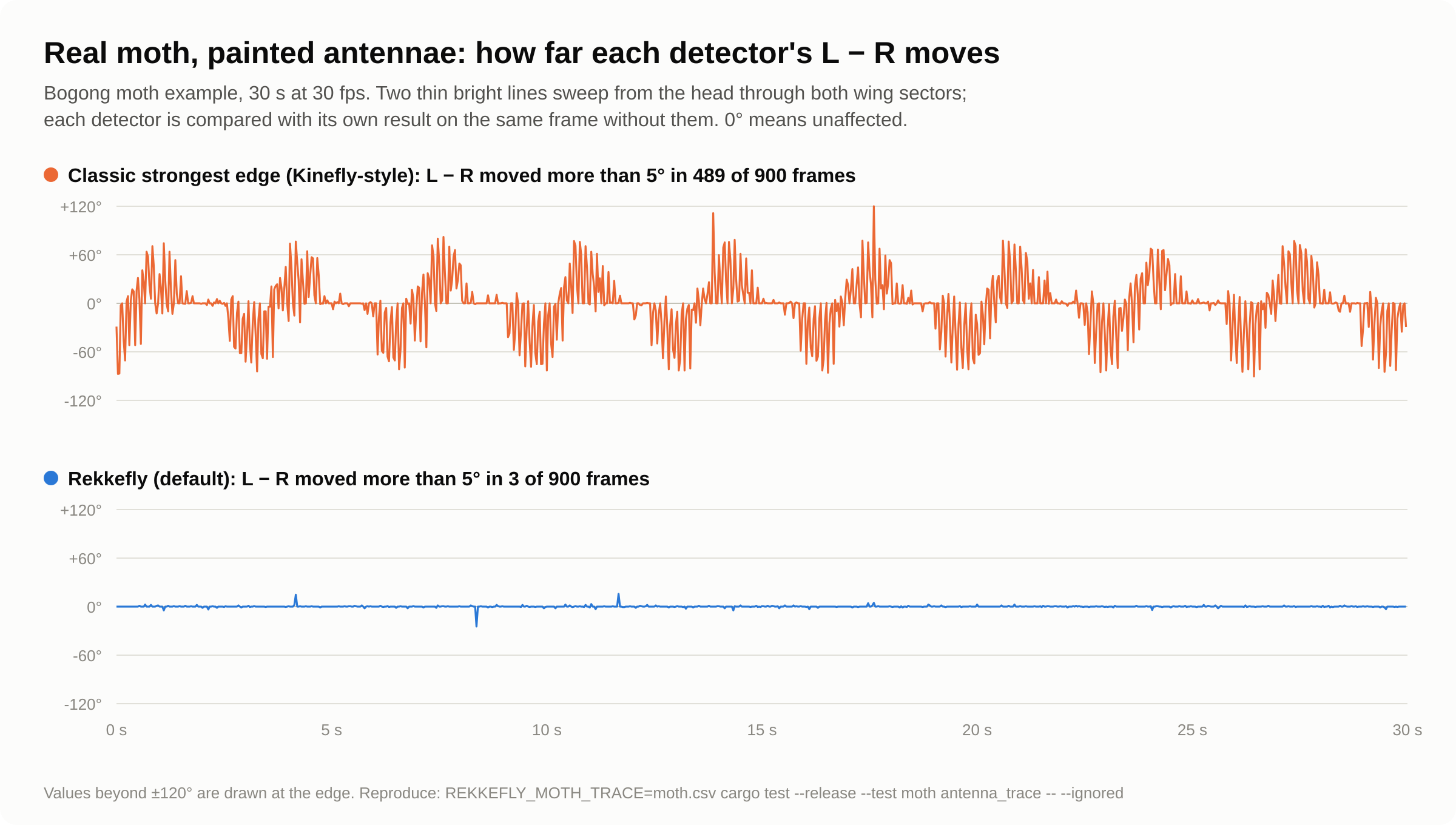
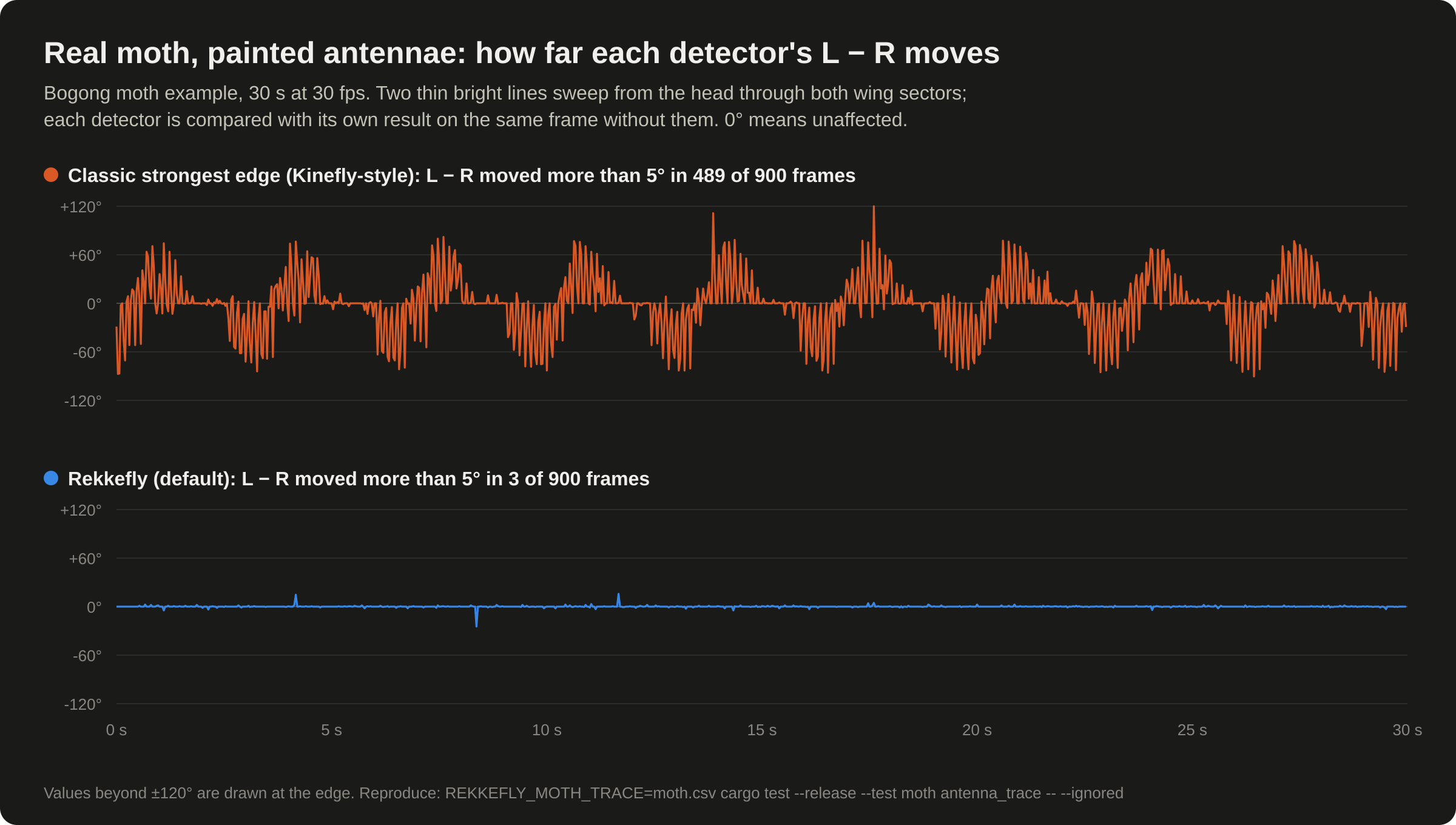
Thin lines painted through the wings of the real moth, compared frame by frame with the same frames without them. And synthetic flies with exactly known angles, legs kicking through the wings.
| Test | Classic | Rekkefly |
|---|---|---|
| Real moth, painted antennae: frames where L − R moved > 5° | 489 / 900 | 3 / 900 |
| Real moth, painted legs 5 px wide | 632 / 900 | 8 / 900 |
| Synthetic: legs kicking through the wings, worst L − R error | 107° | 0.6° |
| Synthetic: front legs reaching forward, wing angles off by > 4° | 720 / 720 | 0 / 720 |
| Median angle error, synthetic flies with known angles | — | ≈ 0.25° |
Reproduce with cargo test --release --test moth -- --ignored and --test intrusions. All the tables, and what is not yet verified.
Performance
Tracking is never the bottleneck.
- Tracking runs on each rig's capture thread, as each frame arrives.
- No frame copies: sectors are sampled from precomputed positions.
- Recording encodes on its own threads, never on the capture path.
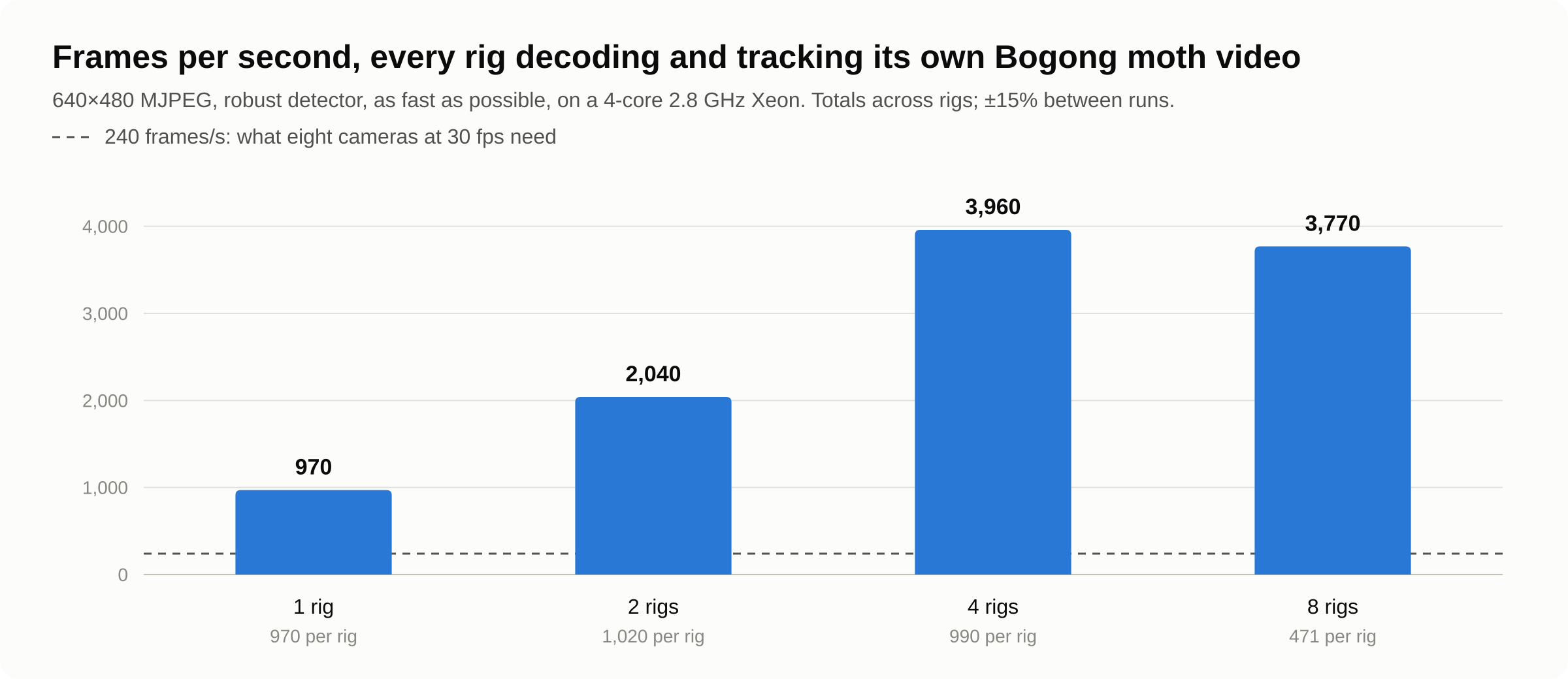
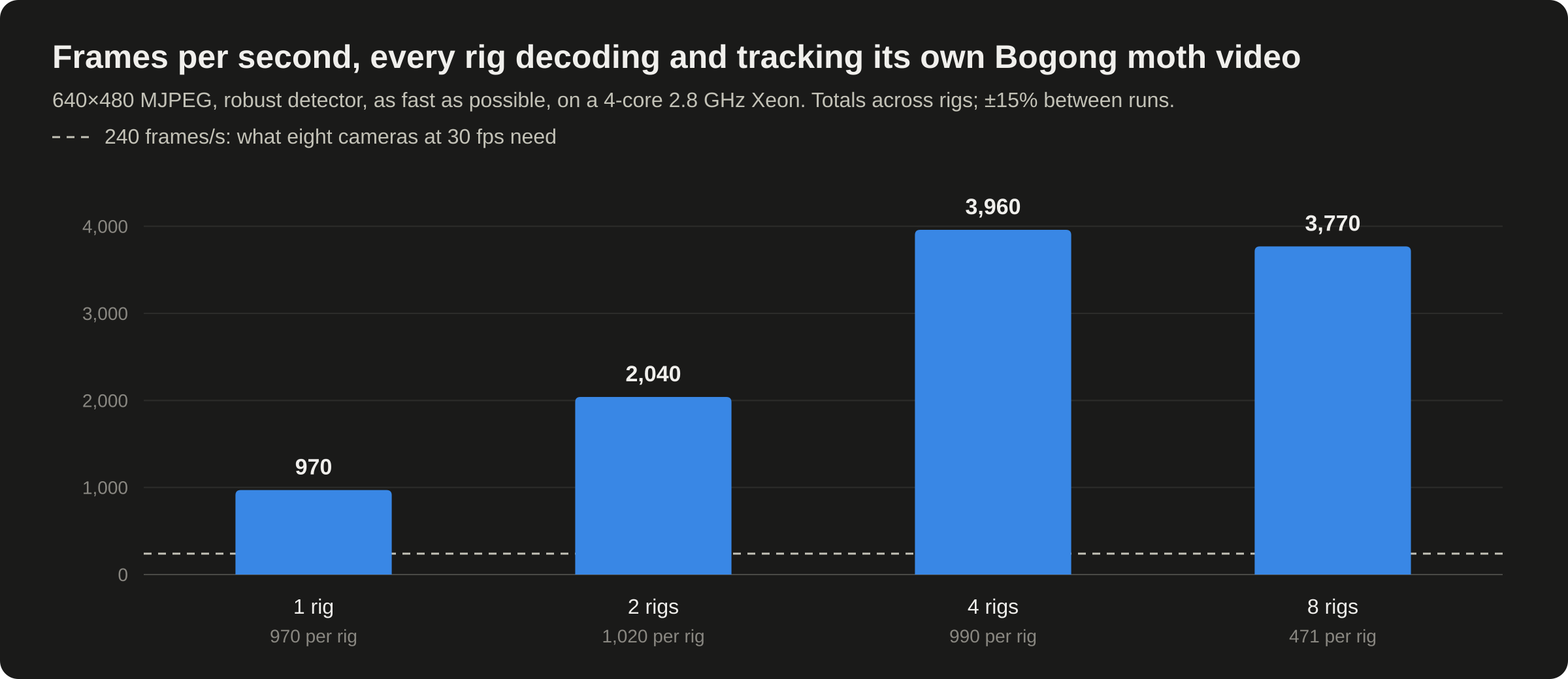
- Eight rigs on four cores still leave 15× headroom at 30 fps.
Lineage
Standing on Kinefly's shoulders.
Rekkefly keeps Kinefly's method and conventions (annular sectors around the hinges, the leading edge of the stroke envelope, angles positive toward the head) and drops the stack around it.
-
Kinefly
Made it practical
Real-time wing, head and abdomen tracking for tethered flight, on ROS 1 and Python 2. Both are now end-of-life.
ssafarik/Kinefly -
Kinefly Docker
Kept it alive
The original stack in a container, plus a bridge that publishes wing angles as simple JSON over ZMQ.
pvnkmrksk/Kinefly_Docker -
Rekkefly
The next step
A native app, written from scratch in Rust, that sends the bridge's message byte for byte, to any ZeroMQ library, Unity's NetMQ included. Point your subscriber at it and it keeps working.
Coming from Kinefly
{"timestamp_unix": 1700000000.125, "pitch": 0.0, "y": -0.5, "x": 0.25,
 "yaw": 0.75, "z": 0.0, "roll": 0.0, "frame_number": 77}
Automation
Built for scripts and AI agents.
A Model Context Protocol server is built in. An agent can list cameras, edit configs with validation, start and stop rigs, read live angles, measure a trial, and see a snapshot with the tracking drawn on it, to check the markers before it measures.
Every command also has --json output, configs are commented TOML, and live data streams over ZMQ and UDP.
# Add Rekkefly to Claude Code (or any MCP client)
claude mcp add rekkefly -- rekkefly mcp

# Then ask: "Start arena 1 on camera 1, check the markers,
#  and give me the mean L − R over a 10-second trial."
start_rig  {config: "camera-a", device: "1", label: "arena-1"}
snapshot   {rig: "arena-1"}          → image with the sectors
measure    {rig: "arena-1", seconds: 10, csv: "trial-01.csv"}
stop_rig {rig: "arena-1"}# Track a whole video, about 1,000 frames/s
rekkefly track trial.avi --config rig.toml --csv angles.csv --json
# Headless, recording, and a JSON report at the end
rekkefly --config rig.toml --headless --record --frames 18000 --json
rekkefly --list-cameras --json
rekkefly clip big.avi snippet.avi --start 60 --duration 30import json, zmq # python3 -m pip install pyzmq
sock = zmq.Context().socket(zmq.SUB)
sock.connect("tcp://127.0.0.1:9871")
sock.setsockopt(zmq.SUBSCRIBE, b"")
while True:
m = json.loads(sock.recv_string())
steer(m["yaw"]) # L − R, radians# rekkefly --rigs rigs.toml --headless --record
[[rigs]]
label = "left-arena"
device = "0"
zmq_port = 9871
udp_target = "127.0.0.1:5601"
[[rigs]]
label = "right-arena"
device = "C920"
zmq_port = 9872
udp_target = "127.0.0.1:5602"Download
Free, open source, and one file to install.
The latest release, for every system. Each includes the Bogong moth example and the example configs.
Read the docs.
From the first five minutes to every setting: installing, placing the markers, tuning, rigs, outputs, agents and the full reference.